Loading
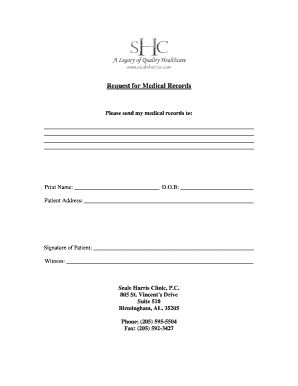
Get Request For Medical Records - Seale Harris Clinic
How it works
-

Open form follow the instructions
-

Easily sign the form with your finger
-

Send filled & signed form or save
How to fill out the Request For Medical Records - Seale Harris Clinic online
Filling out the Request For Medical Records form for Seale Harris Clinic is a straightforward process that can be done online. This guide will provide you with step-by-step instructions to ensure your request is completed accurately and efficiently.
Follow the steps to complete your request for medical records.
- Press the ‘Get Form’ button to retrieve the Request For Medical Records form and open it in your preferred online document editor.
- In the designated space, please write the name of the person or entity to whom you wish to send your medical records. Be sure to include complete contact information.
- Next, fill in your printed name in the appropriate field. This ensures that your identity is clearly recorded on the request.
- Enter your date of birth (D.O.B) in the field provided to verify your identity.
- Provide your current address in the section labeled 'Patient Address'. This information is critical for the clinic to process your request.
- Sign the form in the area labeled ‘Signature of Patient’. This signature serves as your consent for the release of your medical records.
- If applicable, have a witness sign in the designated area. This may not be necessary for all requests but can provide additional verification.
- Once you have completed all required fields and reviewed your information for accuracy, you can choose to save the changes, download a copy, print the form, or share it as needed.
Take the next step towards obtaining your medical records by completing the form online today.
Questions? Please call the Health Information Management (HIM) Department at 317-338-2216 for Ascension St.