Loading
Get Membership Registration
How it works
-

Open form follow the instructions
-

Easily sign the form with your finger
-

Send filled & signed form or save
How to fill out the Membership Registration online
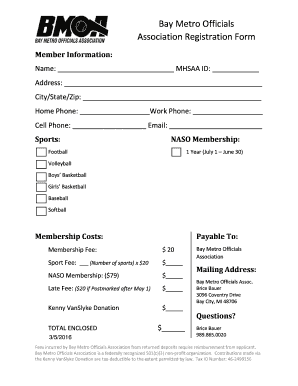
Filling out the Membership Registration online is a straightforward process that allows users to efficiently join the Bay Metro Officials Association. This guide provides step-by-step instructions to ensure a seamless registration experience.
Follow the steps to complete your registration form.
- Click ‘Get Form’ button to obtain the necessary Membership Registration form and access it in the online editor.
- In the Member Information section, provide your full name and MHSAA ID number. This information is essential for identifying your membership.
- Fill in your address including street, city, state, and zip code. Ensure this information is accurate for communication purposes.
- Enter your home, work, and cell phone numbers, followed by your email address. This contact information will be important for association updates and correspondence.
- Indicate your sport preferences by checking the appropriate boxes. You can select multiple sports from the provided list.
- In the Membership Costs section, calculate all applicable fees. This includes the membership fee, sport fees (number of sports selected multiplied by $20), NASO membership fee, and any late fees if applicable. Document your results in the designated fields.
- If you choose to make a contribution to the Kenny VanSlyke Donation, include that amount in the designated section as well.
- Sum all fees to determine the total enclosed and record it in the appropriate field.
- Once all fields are completed and reviewed, save your changes. You can also download, print, or share the form as needed.
Complete your Membership Registration online today and join the Bay Metro Officials Association!
Creating a Registration Form with PayPal Step1: Go to Admin Panel > Under RegistrationMagic, open All Forms > Click on New Form. Step2: After that, add a name to your form. For ease, you can just keep it Registration Form.
Industry-leading security and compliance
US Legal Forms protects your data by complying with industry-specific security standards.
-
In businnes since 199725+ years providing professional legal documents.
-
Accredited businessGuarantees that a business meets BBB accreditation standards in the US and Canada.
-
Secured by BraintreeValidated Level 1 PCI DSS compliant payment gateway that accepts most major credit and debit card brands from across the globe.