Loading
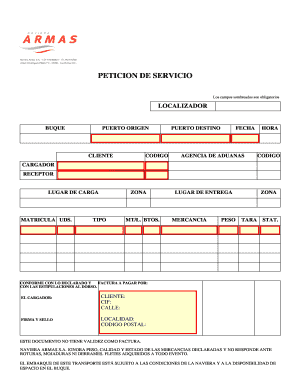
Get Peticion De Servicio Naviera Armas
How it works
-

Open form follow the instructions
-

Easily sign the form with your finger
-

Send filled & signed form or save
How to fill out the Peticion De Servicio Naviera Armas online
The Peticion De Servicio Naviera Armas is a crucial document for users engaging with shipping services. This guide provides a detailed step-by-step process to assist you in completing the form online, ensuring a smooth and efficient experience.
Follow the steps to successfully complete the Peticion De Servicio online.
- Press the ‘Get Form’ button to obtain the Peticion De Servicio and open it in the online editor.
- Locate the 'Localizador' field. Input your unique reference number to identify your service request.
- In the 'Buque' section, specify the vessel name associated with your shipment.
- Fill in the 'Puerto Origen' with the port of departure for your shipment.
- Provide the 'Cliente' details, including name and relevant contact information.
- Enter the 'Codigo' that corresponds to your service order.
- Indicate the 'Puerto Destino' where you want the shipment to arrive.
- Specify the 'Fecha' for the expected departure or arrival.
- If applicable, include details about the 'Agencia de Aduanas' handling your customs.
- Input the 'Hora' of shipment departure.
- In the 'Cargador' section, enter the details of the person or entity responsible for the cargo.
- Fill in the 'Receptor' information, indicating who will receive the cargo.
- Provide the 'Lugar de Carga' where the cargo will be loaded.
- Specify 'Matricula Uds.' relevant to the units involved in the shipment.
- Indicate the 'Zona' related to your shipments, such as the designated area for handling.
- In the 'Tipo' section, select the type of cargo being transported.
- Enter the 'Metr.','Litros' or 'Btos' depending on the measurement unit. Ensure accuracy.
- Provide the 'Lugar de Entrega' where the cargo will be delivered.
- Clearly describe the 'Mercancia' being shipped.
- Fill in the 'Peso' which indicates the total weight of the cargo.
- Enter relevant 'Zona' for delivery, if different from the loading zone.
- Specify the 'Tara', which refers to the weight of the packaging or container.
- Choose 'Stat.' options available that relate to the nature of your shipment.
- Confirm ‘Conforme con lo declarado y factura a pagar por’ to acknowledge understanding and agreement.
- The 'Cliente' section requires your signature and stamp to validate the document.
- After completing all fields, save changes, download, print or share the Peticion De Servicio as required.
Complete your documents online today for an efficient shipping experience.
Personas con movilidad reducida Se solicitará además que durante la compra del billete se firme la comunicación de solicitud de asistencia especial.