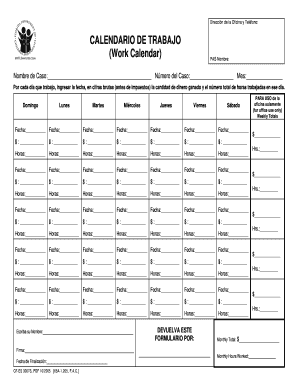
Direccin de la Oficina y Telfono:ClearCALENDARIO DE TRABAJO (Work Calendar)PAS Nombre:Nombre de Caso: Nmero del Caso: Mes: Por cada da que trabajo, ingresar la fecha, en cifras brutas (antes de impuestos).

How it works
  • Open form

    Open form follow the instructions

  • Easily sign form

    Easily sign the form with your finger

  • Share form

    Send filled & signed form or save

How to fill out the FL CF-ES 3007S online

The FL CF-ES 3007S form, used for documenting work hours and earnings, has several sections that must be accurately completed to ensure proper processing. This guide provides detailed instructions to assist you in filling out the form online seamlessly.

Follow the steps to complete the FL CF-ES 3007S form online.

  1. Click the ‘Get Form’ button to obtain the FL CF-ES 3007S form and open it in your preferred editing application.
  2. Enter your name in the 'PAS Nombre' field at the top of the form.
  3. Provide the 'Nombre de Caso' (Case Name) and 'Número del Caso' (Case Number) in the designated fields.
  4. Select the current month in the 'Mes' (Month) field.
  5. For each day of the week listed, enter the date, amount earned (before taxes), and total hours worked for that day in the appropriate boxes.
  6. Continue completing the sections for each day through the week.
  7. In the 'Weekly Totals' section, sum up your earnings and hours worked for the week.
  8. For office use, leave the designated fields blank unless instructed otherwise.
  9. Once all fields are filled accurately, proceed to save your changes.
  10. Choose to download, print, or share the form as necessary.

Complete your FL CF-ES 3007S form online today.

Get form

Experience a faster way to fill out and sign forms on the web. Access the most extensive library of templates available.

Related content

Z'-LNACA “'”“ ..

by S Gordon · 1956 · Cited by 2 — The parameters included are specific impulse...

Learn more
Fla. Admin. Code Ann. R. 65A-1.205 - Eligibility...

(1) The individual completes and submits a Department application for public assistance...

Learn more
Questions & Answers

Get answers to your most pressing questions about US Legal Forms API.

Contact support

What is an example of a self-employment statement?

An example of a self-employment statement is a declaration detailing your business activities and income, formatted according to the FL CF-ES 3007S. It should clearly express your business name, responsibilities, and income. This creates a formal record that can be used for various administrative purposes.

To write a proof of self-employment letter, start by introducing yourself and your business. Specify your role, the services offered, and include your earnings along with any relevant tax information. You can also refer to the FL CF-ES 3007S, which helps inform interested parties of your self-employment status.

Writing a personal sworn statement involves clearly stating your experience and income as a self-employed individual. Utilize the FL CF-ES 3007S format to outline your business activities, verify your income, and ensure everything is truthful. This method provides a formal declaration that can assist in official matters.

Filling out a self-employment sworn statement requires you to accurately detail your business activities and income. Use the FL CF-ES 3007S form to specify your earnings, the nature of your work, and any relevant expenses. Once completed, remember to sign the document to validate your information.

To fill out a self-employment affidavit, start by gathering your business details, including your name, business name, and address. Next, provide information on your income, expenses, and duration of self-employment. Finally, ensure you download the FL CF-ES 3007S form from a reliable source, fill it out completely, and sign it before submitting.

The fastest method to obtain food stamps in Florida is to apply online through the DCF Access Florida platform. Be sure to submit all necessary documentation and clearly indicate any urgent needs. The FL CF-ES 3007S form can expedite your application, helping you access benefits without unnecessary delays.

To secure food stamps quickly in Florida, complete your application online through the DCF Access Florida portal. Ensure that you provide all requested information accurately, and check for any urgent assistance options. Using the FL CF-ES 3007S can streamline your application, making it easier to navigate the process and receive support promptly.

Certain factors can disqualify you from receiving food stamps in Florida. These include failing to provide required documents, exceeding income limits, or being non-compliant with work requirements. Understanding these disqualifications can help you prepare your application more effectively through the FL CF-ES 3007S form, ensuring you have the best chance of approval.

You can easily upload documents to DCF Access Florida by logging into your online account. Once there, navigate to the section for uploading documents and follow the prompts to attach files. Ensure that all documents are clear and legible, as this will speed up the processing of your application related to the FL CF-ES 3007S. If you encounter issues, consider reaching out to DCF support.

To obtain same day SNAP benefits in Florida, you need to apply online or visit your local Department of Children and Families (DCF) office. If you face a food emergency, clearly indicate this in your application. Additionally, ensure that your application is complete and all necessary information is provided. This way, you may qualify for immediate assistance through the FL CF-ES 3007S process.

Get This Form Now!

Use professional pre-built templates to fill in and sign documents online faster. Get access to thousands of forms.

If you believe that this page should be taken down, please follow our DMCA take down process here.

Get FL CF-ES 3007S