Loading
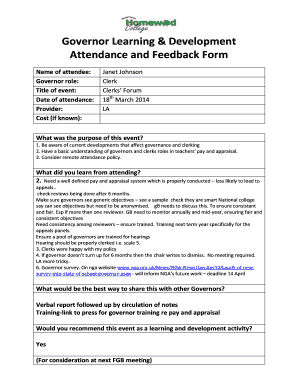
Get Governor Learning Development Attendance And Feedback Form - Homewood Brighton-hove Sch
How it works
-

Open form follow the instructions
-

Easily sign the form with your finger
-

Send filled & signed form or save
How to fill out the Governor Learning Development Attendance And Feedback Form - Homewood Brighton-hove Sch online
This guide provides a clear and detailed approach to filling out the Governor Learning Development Attendance And Feedback Form by Homewood Brighton-hove Sch online. It aims to support users in completing the form accurately and efficiently.
Follow the steps to fill out the form correctly.
- Press the 'Get Form' button to access the form and open it in your preferred digital editor.
- Begin by entering your name in the designated field. Ensure that the name is spelled correctly as it will be used for records.
- Fill in your governor role in the appropriate section. This helps to categorize your participation level and responsibilities.
- Input the title of the event you are attending. This should match the event's official name for proper documentation.
- Enter the date of attendance. Make sure to follow the format required, typically day, month, and year.
- List the provider of the event. This is important for referencing the organization that conducted the training.
- If applicable, indicate the cost of the event in the cost section. If you do not have this information, you may leave it blank.
- Describe the purpose of the event. You can refer to the listed purposes, ensuring your responses are reflective of your personal experience.
- Summarize what you learned from attending the event. Offer detailed insights as it will contribute to your professional development records.
- Decide how you will share this information with other governors. Select your preferred method, such as a verbal report or sharing notes.
- Indicate whether you would recommend the event as a learning and development activity and provide your reasoning.
- If you have any recommendations for changes at Homewood College, list them in the designated section.
- Once you have filled out the form, save your changes, then download, print, or share the completed form as required. Finally, email the form to the designated recipient, ensuring to cc the relevant email address.
Complete your documents online today to ensure effective record keeping and governance.
send an email to schooladmissions@brighton-hove.gov.uk. phone 01273 293 653.
Industry-leading security and compliance
US Legal Forms protects your data by complying with industry-specific security standards.
-
In businnes since 199725+ years providing professional legal documents.
-
Accredited businessGuarantees that a business meets BBB accreditation standards in the US and Canada.
-
Secured by BraintreeValidated Level 1 PCI DSS compliant payment gateway that accepts most major credit and debit card brands from across the globe.