Loading
Get Stanbic Business Online
How it works
-

Open form follow the instructions
-

Easily sign the form with your finger
-

Send filled & signed form or save
How to fill out the Stanbic Business Online online
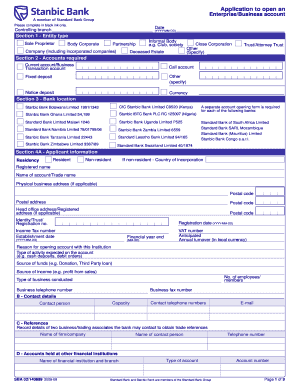
This guide provides detailed instructions on how to complete the Stanbic Business Online application for opening an enterprise or business account. Whether you are a sole proprietor or a corporate entity, this step-by-step approach will ensure you fill out the form accurately and efficiently.
Follow the steps to successfully complete your application.
- Press the ‘Get Form’ button to access the application form and open it in your preferred document editor.
- Begin by entering the date in the format YYYY-MM-DD and specify the controlling branch for your account.
- In section 1, select the entity type that describes your business. Options include sole proprietor, partnership, body corporate, and others. Ensure to check the appropriate box.
- Move to section 2 to indicate the types of accounts you are required to open. List options such as current, call, fixed deposit, or others as applicable.
- For section 3, specify the location of the bank by selecting the appropriate Stanbic Bank branch that you wish to associate with your account.
- Complete section 4A with applicant information. Include details on residency status, registered business name, physical business address, identity or registration numbers, and anticipated annual turnover.
- In section B, identify a contact person and provide their contact details, ensuring to include phone numbers and an email address.
- Under section C, record the names and contact numbers of two business or trading associates that the bank may contact for references.
- Proceed to section 5 to provide details about related parties. This section requires information on authorized signatories and their corresponding identities.
- In sections 6 and 7, provide any necessary information related to chequebooks, bank statements, resolutions, and marketing or research consents as required.
- Conclude by filling in the certification section, ensuring you sign and date the document. Review all information for accuracy.
- Finally, save changes to the completed form, then download, print, or share the document as necessary.
Start your application today to manage your business finances more effectively!
Immediate payments Tap Transact. Tap Payments. Choose the beneficiary and select Pay. Enter the payment details. Tap Immediate payment. Enter your secret Remote PIN to confirm.