Loading
Get How Do I... Office Of Billing And Payment Services Georgetown ... - Studentaccounts Georgetown
How it works
-

Open form follow the instructions
-

Easily sign the form with your finger
-

Send filled & signed form or save
How to fill out the How Do I... Office Of Billing And Payment Services Georgetown online
This guide provides clear instructions to help users complete the How Do I... Office Of Billing And Payment Services Georgetown form online. Following these steps will ensure that you accurately fill out the required sections and successfully submit your form.
Follow the steps to complete your form effectively.
- To access the form, click the ‘Get Form’ button to retrieve it and open it for editing.
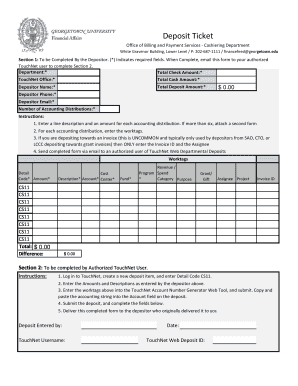
- In Section 1, begin by completing the fields to be filled out by the depositor. Fields marked with an asterisk (*) are mandatory. Enter your department name, total check amount, TouchNet office, total cash amount, total deposit amount, your name, phone number, and email address.
- Indicate the number of accounting distributions. For each distribution, provide a line description along with the corresponding amount. If you have more than six distributions, you must attach a second form.
- For each accounting distribution, enter the necessary worktags and ensure that everything is accurate.
- If applicable, and you are depositing towards an invoice (a scenario that is not common), only provide the invoice ID and the assignee’s information.
- Once all required information in Section 1 is completed, email the form to your authorized TouchNet user to proceed with Section 2.
- Section 2 must be completed by an authorized TouchNet user. They will log in to TouchNet, create a new deposit item, and enter the Detail Code CS11, along with the amounts and descriptions you specified.
- The authorized user will then input the worktags into the TouchNet Account Number Generator Web Tool and submit the information. They should copy and paste the accounting string into the appropriate field on the deposit.
- Finally, the authorized user submits the deposit and completes the remainder of Section 2 before delivering the completed form back to you.
Complete your documents online today for an efficient workflow!
In an effort to provide students and parents with additional flexibility when making payments, Georgetown will accept payment by credit card and debit card from all students and their authorized users. This document serves as a list of answers to frequently asked questions (FAQ). Click on links to expand.
Industry-leading security and compliance
US Legal Forms protects your data by complying with industry-specific security standards.
-
In businnes since 199725+ years providing professional legal documents.
-
Accredited businessGuarantees that a business meets BBB accreditation standards in the US and Canada.
-
Secured by BraintreeValidated Level 1 PCI DSS compliant payment gateway that accepts most major credit and debit card brands from across the globe.