Loading
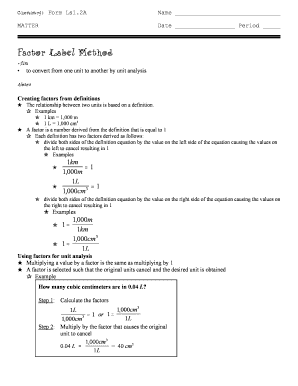
Get Evans Chemistry Corner
How it works
-

Open form follow the instructions
-

Easily sign the form with your finger
-

Send filled & signed form or save
How to fill out the Evans Chemistry Corner online
This guide provides clear and detailed instructions on how to complete the Evans Chemistry Corner form online. By following these steps, users will be able to fill out each section of the form with confidence.
Follow the steps to effectively complete the form
- Click ‘Get Form’ button to access the Evans Chemistry Corner form and open it in your editor.
- Fill in your name at the top of the form, as this identifies you as the user of the document.
- Next, enter the date and period in the designated fields to provide context for your submission.
- Proceed to the main body of the form, which covers the Factor Label Method. Read through the aim section for clarity on the conversion purpose.
- Review the notes section and examples carefully. This aids in understanding how to create factors and perform unit conversions.
- Answer the questions provided in the form by circling the number of the correct response for each question to ensure accurate representation of your understanding.
- Finally, review all completed sections for accuracy. Once satisfied, you can save changes, download, print, or share the completed form.
Start filling out the Evans Chemistry Corner form online today!