Loading
Get Student Health Profile
How it works
-

Open form follow the instructions
-

Easily sign the form with your finger
-

Send filled & signed form or save
How to fill out the Student Health Profile online
Completing the Student Health Profile online is an essential step in ensuring that your health information is communicated effectively to your educational institution. This guide provides clear instructions to help you navigate each section of the form with confidence.
Follow the steps to complete your Student Health Profile online.
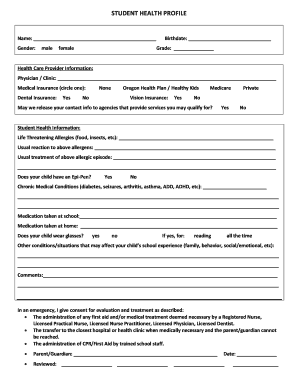
- Select the ‘Get Form’ button to access the form and open it for editing.
- Begin by filling in your name in the designated field at the top of the form.
- Indicate your gender by selecting either 'male' or 'female' in the appropriate section.
- Enter your birthdate in the provided field, formatted as month/day/year.
- Specify your current grade level in the section that requests this information.
- Complete the health care provider information by providing the name of your physician or clinic.
- Circle your medical insurance option from the list provided, including options such as 'None', 'Oregon Health Plan/Healthy Kids', or any applicable provider.
- Indicate whether you have dental insurance, selecting 'Yes' or 'No' as appropriate.
- Answer the vision insurance question by circling 'Yes' or 'No' and detailing the type of coverage if applicable.
- Respond to the question about releasing your contact information to potential service agencies by selecting 'Yes' or 'No'.
- List any life-threatening allergies and detail the usual reactions and treatments for these allergies.
- Indicate whether your child possesses an Epi-Pen, selecting 'Yes' or 'No'.
- Outline any chronic medical conditions your child may have that could affect their educational experience.
- Document any medication that your child takes at school or at home.
- State whether your child wears glasses, along with the purpose (reading, all the time, etc.) if applicable.
- Provide any additional information regarding conditions or situations that may impact your child's school experience.
- Make any necessary comments or notes in the comments section.
- In the emergency consent section, confirm your consent for medical evaluation and treatment as needed by signing and dating the section.
- After completing all sections of the form, ensure to save your changes, and choose to download, print, or share the document as required.
Complete your Student Health Profile online today to ensure your information is up-to-date and accessible for your educational needs.
School Health Profiles is a survey for middle and high school Principals and Lead Health Teachers to assess the status of health and wellness-related policies, procedures, instruction, and environments.