Loading
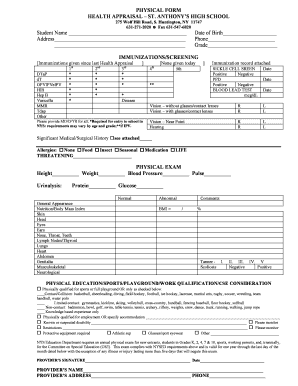
Get Physical Form Health Appraisal St Anthonys High School - Stanthonyshs
How it works
-

Open form follow the instructions
-

Easily sign the form with your finger
-

Send filled & signed form or save
How to fill out the physical form health appraisal St. Anthony's High School online
This guide provides a clear and supportive approach to filling out the physical form health appraisal for St. Anthony's High School. The online process is designed to be straightforward, ensuring that all necessary information is recorded accurately.
Follow the steps to complete the form efficiently.
- Press the 'Get Form' button to access the physical form health appraisal and open it in the designated editor.
- Begin by entering the student’s name in the designated field at the top of the form. Ensure that the name is spelled correctly.
- Fill in the student's address, including street, city, state, and ZIP code to provide a complete location.
- Provide the date of birth, ensuring that you use the correct format. This information is crucial for identification purposes.
- Enter a valid phone number that can be used for communication. Ensure it is reachable and accurate.
- Indicate the student's current grade level. This will help in categorizing the health appraisal requirements.
- Complete the immunizations and screening section by marking the immunizations received since the last health appraisal. You should also indicate any positive or negative sickle cell screening and the results of the blood lead test.
- If relevant, attach the immunization record and provide the dates for each entry to ensure compliance with New York State requirements.
- Fill out the vision and hearing sections as instructed, marking the appropriate fields for right and left vision results.
- Document any significant medical or surgical history and any allergies the student may have in the designated section.
- Complete the physical exam section by entering height, weight, blood pressure, pulse, and urinalysis details, including any abnormalities.
- Assess the physical education and sports qualifications. Check the appropriate boxes for sports participation, employment qualifications, disabilities, or required accommodations.
- Finally, ensure that the provider’s signature, name, address, and phone number are included. Sign and date the form in the required fields.
- Review all information for accuracy, then save changes, download, print, or share the completed form as needed.
Complete your documents online today to ensure your student's health appraisal is processed efficiently.
Industry-leading security and compliance
US Legal Forms protects your data by complying with industry-specific security standards.
-
In businnes since 199725+ years providing professional legal documents.
-
Accredited businessGuarantees that a business meets BBB accreditation standards in the US and Canada.
-
Secured by BraintreeValidated Level 1 PCI DSS compliant payment gateway that accepts most major credit and debit card brands from across the globe.