Loading
Get Department Of Health And Family Services Division Of Public Health Dph 5022 (rev
How it works
-

Open form follow the instructions
-

Easily sign the form with your finger
-

Send filled & signed form or save
How to fill out the DEPARTMENT OF HEALTH AND FAMILY SERVICES Division Of Public Health DPH 5022 (Rev) online
This guide provides clear, step-by-step instructions for users to effectively complete the DEPARTMENT OF HEALTH AND FAMILY SERVICES Division Of Public Health DPH 5022 (Rev) form online. By following these guidelines, you can ensure that your adoption report is filled out accurately and submitted properly.
Follow the steps to complete your adoption report.
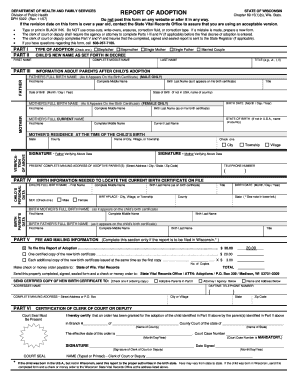
- Initiate the process by clicking the ‘Get Form’ button to access the report of adoption form online.
- Begin by filling out Part I, which requires you to check the type of adoption you are reporting. Options include 'Stefather', 'Stepmother', 'Single Mother', 'Single Father', and 'Married Couple'. Provide the child's new name as it appears in the decree, including the first name, middle name, and last name.
- In Part II, you will provide information about the adoptive parents after the child's adoption. Fill in the details for the father and mother, including their full birth names as they appear on their respective birth certificates, along with their dates of birth and states of birth.
- Part III requires verification of the data provided. Both parents must sign this section to confirm that the information is accurate.
- Proceed to Part IV, which requests the child's personal data. Fill in the child's full birth name, birthplace, birth date, and sex. Additionally, provide the names of the birth parents corresponding to the information on the child's birth certificate.
- In Part V, complete the fee and mailing information section only if the report is to be filed in Wisconsin. Specify the payment amount and make your check or money order payable to the State of Wisconsin Vital Records.
- Lastly, complete Part VI, which includes certification from the clerk of court or deputy. This section must contain a court seal, the signature of the clerk, and the court case number. Ensure all information is filled correctly before saving your changes.
- Once you have completed and reviewed the form, save your changes, and you may download, print, or share the document as necessary.
Complete the DEPARTMENT OF HEALTH AND FAMILY SERVICES Division Of Public Health DPH 5022 (Rev) form online today to ensure a smooth adoption process.
In Wisconsin, BadgerCare Plus refers to Medicaid coverage for low-income children, pregnant women, and adults under 65. These populations can qualify for coverage based on income (MAGI), regardless of assets.
Industry-leading security and compliance
US Legal Forms protects your data by complying with industry-specific security standards.
-
In businnes since 199725+ years providing professional legal documents.
-
Accredited businessGuarantees that a business meets BBB accreditation standards in the US and Canada.
-
Secured by BraintreeValidated Level 1 PCI DSS compliant payment gateway that accepts most major credit and debit card brands from across the globe.