Loading
Get Da 3434 1993-2026
How it works
-

Open form follow the instructions
-

Easily sign the form with your finger
-

Send filled & signed form or save
How to fill out the DA 3434 online
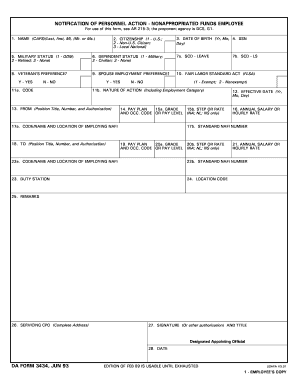
This guide provides clear and concise instructions on how to fill out the DA 3434, a form used for personnel actions for nonappropriated funds employees. Follow the steps outlined below to complete the form accurately and efficiently.
Follow the steps to properly complete the DA 3434 online
- Click the ‘Get Form’ button to obtain the form and open it in your browser or preferred editor.
- Start by entering your name in capital letters. Fill in the last name, first name, and middle initial, along with the honorific Mr. or Ms. as applicable.
- Indicate your citizenship status by selecting one of the following options: 1 for U.S. citizen, 2 for Non-U.S. citizen, or 3 for Local National.
- Provide your date of birth using the format (Year, Month, Day), and include your Social Security Number (SSN) in the specified field.
- Select your military status by choosing one of the following: 1 for On Duty Military (ODM), 2 for Retired, or 3 for None.
- Specify your dependent status by selecting either 1 for Military, 2 for Civilian, or 3 for None.
- Enter the Seniority Date (SCD) for leave purposes in the designated field.
- Indicate whether you have veteran's preference by marking ‘Y’ for Yes or ‘N’ for No.
- Indicate your spouse's employment preference by marking the appropriate option.
- Specify if you are covered under the Fair Labor Standards Act (FLSA) by selecting Yes (Y) or No (N). Then, choose your exemption status: 1 for Exempt and 2 for Nonexempt.
- Describe the nature of the action being reported, including the employment category.
- Fill in the details for the FROM section, including position title, number, and authorization.
- Input the pay plan and grade/occupational code or pay level in the corresponding fields.
- Enter the effective date of this personnel action in the specified format (Year, Month, Day).
- Provide the standard NAFI number along with the code, name, and location of the employing NAFI.
- Complete the TO section with the relevant position title, number, and authorization.
- Specify the annual salary or hourly rate for the new position.
- Fill in the duty station and location code as required.
- Add any remarks that may be necessary to clarify the personnel action.
- Complete the section for servicing CPO with the complete address.
- Provide the signature or authorization along with the title of the designated appointing official, and enter the date.
- Once all information is complete, ensure to save changes, download, print, or share the form as needed.
Complete your DA 3434 form online today for a smooth personnel action process.
DA Form 3964 is used to report the location of Army personnel. This report helps in managing soldier assignments and ensuring accurate accountability. Understanding the importance of DA Form 3964 contributes to an effective team dynamic. When completed correctly, it enhances communication within the military and supports operational efficiency.