Loading
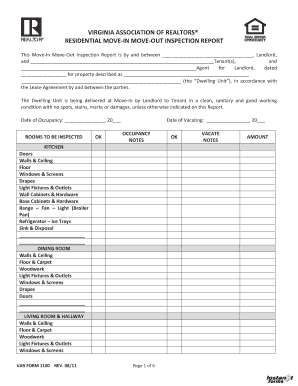
Get Var Form 1100- Fl Edits V3doc
How it works
-

Open form follow the instructions
-

Easily sign the form with your finger
-

Send filled & signed form or save
How to fill out the VAR Form 1100- FL Edits V3doc online
This guide is designed to help users navigate the online completion of the VAR Form 1100- FL Edits V3doc. Whether you are a landlord, tenant, or agent, this step-by-step approach will simplify the process and ensure that all necessary information is accurately captured.
Follow the steps to fill out the VAR Form 1100- FL Edits V3doc.
- Press the ‘Get Form’ button to access the form and open it in your chosen editor.
- Begin by filling in the basic details at the top of the form, including the names of the landlord and tenant(s) as well as the date of the inspection.
- Complete the section for the property description by accurately identifying the dwelling unit.
- Indicate the date of occupancy and date of vacating. This is important for tracking the timeline of the lease.
- Move on to the 'Rooms to be Inspected' section. Each room has designated areas that need to be assessed. Start with the kitchen, documenting the condition of doors, walls, and appliances.
- Proceed to fill out the dining room inspection details, ensuring to check all listed components such as walls and windows.
- Continue through each listed room, including bedrooms and bathrooms, completing the descriptions for fixtures and overall condition.
- Once all rooms are inspected, address any miscellaneous areas like heating units and smoke detectors as listed in the form.
- Document any occupancy or vacate notes as necessary, using 'OK' or specifying issues where applicable.
- In the final section, review any deposits or service charge details, making sure to fill out any monetary amounts accurately.
- After reviewing all information for accuracy, save your changes, download the completed form, and share it as needed.
Start filling out your VAR Form 1100- FL Edits V3doc online today to ensure a smooth inspection process.