Loading
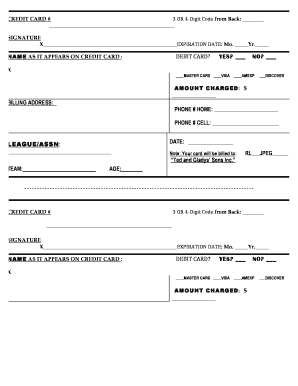
Get Sportography Order Form
How it works
-

Open form follow the instructions
-

Easily sign the form with your finger
-

Send filled & signed form or save
How to fill out the Sportography Order Form online
Filling out the Sportography Order Form online can streamline the ordering process, making it easy to submit essential information securely. This guide will provide clear and detailed instructions to help you complete each section of the form with confidence.
Follow the steps to successfully complete your online order form.
- Click ‘Get Form’ button to obtain the form and open it for editing.
- Fill in the credit card number in the designated field, ensuring accuracy to avoid processing issues.
- Provide the 3 or 4-digit code from the back of the credit card for security verification.
- Enter your signature in the provided space to authorize the transaction.
- Select the expiration date of your credit card by indicating the month and year.
- Input the name as it appears on the credit card to confirm identity.
- Specify if you are using a debit card by selecting 'Yes' or 'No' in the relevant section.
- Check the card type you are using—MasterCard, Visa, American Express, or Discover.
- Indicate the amount to be charged in the designated field, ensuring you have included the total correctly.
- Provide your billing address to ensure the accurate processing of the transaction.
- Enter your home and cell phone numbers, as required, for contact purposes.
- Fill in the league or association name if applicable to your order.
- Record the date of the order in the specified section.
- Complete the team name and age sections to provide additional details regarding your order.
- After completing the form, review all entries for accuracy. You may save changes, download, print, or share the form as needed.
Complete your Sportography Order Form online today for a seamless ordering experience.