Loading
Get Jersey Mikes Order Online
How it works
-

Open form follow the instructions
-

Easily sign the form with your finger
-

Send filled & signed form or save
How to fill out the Jersey Mike’s Order Online online
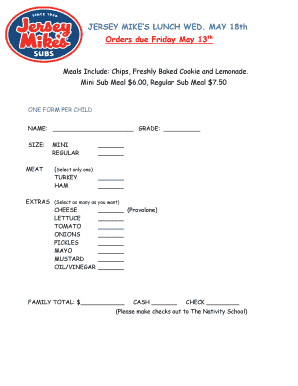
Filling out the Jersey Mike’s Order Online form is a straightforward process designed to streamline your meal orders. This guide will walk you through each section of the form, ensuring that you provide all necessary information accurately and efficiently.
Follow the steps to complete your order form successfully.
- Press the ‘Get Form’ button to obtain the document and access it in the designated editor.
- Begin by entering the child’s name in the designated field marked 'NAME'.
- Input the appropriate grade for the child in the field labeled 'GRADE'.
- Select the size of the meal by marking either 'MINI' or 'REGULAR' only once.
- Choose the preferred meat option by selecting either 'TURKEY' or 'HAM'.
- In the 'EXTRAS' section, you can choose any combination of additional items. Mark your selections for any or all of the options such as 'CHEESE', 'LETTUCE', 'TOMATO', 'ONIONS', 'PICKLES', 'MAYO', 'MUSTARD', and 'OIL/VINEGAR'.
- Calculate the family total based on the selected meals and enter it in the 'FAMILY TOTAL' field.
- Indicate your payment method by marking either 'CASH' or 'CHECK', and remember to make checks payable to The Nativity School.
- Once all sections are filled out accurately, ensure all changes are saved. You can then download, print, or share the completed form as needed.
Complete your Jersey Mike’s Order Online form today to ensure your meals are ready!
First time here so I had to ask the difference.. regular is 7 inches while the giant is 15 inches! I watched the team make sandwiches and they looked great. I went for a Philly Cheese with onions and peppers - regular and it was very tasty and filling.