Loading
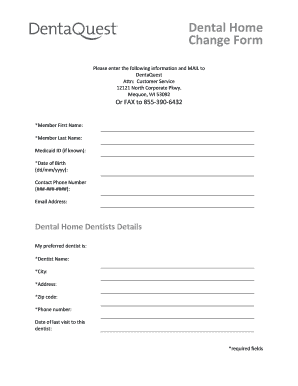
Get Dental Home Change Form - Dentaquest
How it works
-

Open form follow the instructions
-

Easily sign the form with your finger
-

Send filled & signed form or save
How to fill out the Dental Home Change Form - DentaQuest online
Filling out the Dental Home Change Form - DentaQuest online is a straightforward process that ensures your information is updated with your dental provider. This guide will walk you through each section of the form, providing clear instructions to facilitate a smooth experience.
Follow the steps to successfully complete the Dental Home Change Form.
- Use the ‘Get Form’ button to access the form and open it in your document editor.
- Begin by filling in your basic information. Enter your member first name, member last name, and Medicaid ID if known. It is important to ensure that this information is accurate.
- Next, provide your date of birth in the format of dd/mm/yyyy. This helps verify your identity.
- Fill in your contact phone number using the format ###-###-####. This number will be used for any follow-up communications.
- Enter your email address to receive any notifications or confirmations regarding your submission.
- In the dental home dentist details section, state your preferred dentist's name. This is essential for routing your request to the correct provider.
- Provide the city where your dentist practices, along with the full address and zip code.
- Include the dentist's phone number for quick reference.
- Lastly, indicate the date of your last visit to this dentist. This helps keep all records up to date.
- Once you have completed the form, you can save your changes, download it for your records, print it, or share it as needed. Ensure that you send the completed form to DentaQuest either by mailing it to the provided address or faxing it.
Complete your Dental Home Change Form online today for seamless communication with your dental provider.
DentaQuest.com or by calling Member Services at 1-888-468-5509, TTY: 1-800-466-7566.