Loading
Get Gojimtv
How it works
-

Open form follow the instructions
-

Easily sign the form with your finger
-

Send filled & signed form or save
How to fill out the Gojimtv online
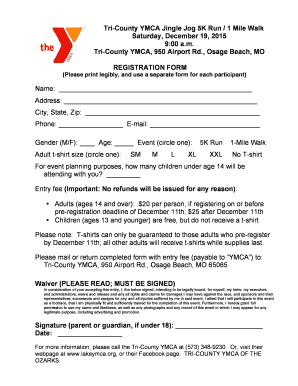
This guide provides a step-by-step approach for users to efficiently complete the Gojimtv registration form online. By following these instructions, you will ensure that all necessary information is accurately submitted.
Follow the steps to fill out the Gojimtv registration form.
- Click 'Get Form' button to obtain the registration form and open it in the online editor.
- Enter your full name in the designated field. Ensure to write legibly, as this is vital for your registration.
- Fill in your complete address, including street, city, state, and zip code in the respective fields.
- Provide your contact number and email address to facilitate communication regarding the event.
- Indicate your gender by selecting 'M' for male or 'F' for female in the gender field.
- Input your age in the age field to ensure accurate categorization for the event.
- Circle the event you wish to participate in—5K run or 1-mile walk on the form.
- Select your adult t-shirt size by circling the appropriate size option among SM, M, L, XL, XXL, or choose 'No T-shirt'.
- Indicate the number of children under age 14 who will accompany you by filling in the quantity in the designated space.
- Review the entry fees listed. Ensure to include the correct fee, payable to 'YMCA', according to your registration date.
- Read the waiver carefully. By signing, you agree to the terms outlined regarding participation and liability.
- Sign the form where indicated, ensuring that a parent or guardian signs if the participant is under 18 years old.
- Complete the date field next to your signature.
- Finally, save changes to your form, then download, print, or share the completed document as required.
Complete your registration online today to secure your spot for the event!
Industry-leading security and compliance
US Legal Forms protects your data by complying with industry-specific security standards.
-
In businnes since 199725+ years providing professional legal documents.
-
Accredited businessGuarantees that a business meets BBB accreditation standards in the US and Canada.
-
Secured by BraintreeValidated Level 1 PCI DSS compliant payment gateway that accepts most major credit and debit card brands from across the globe.