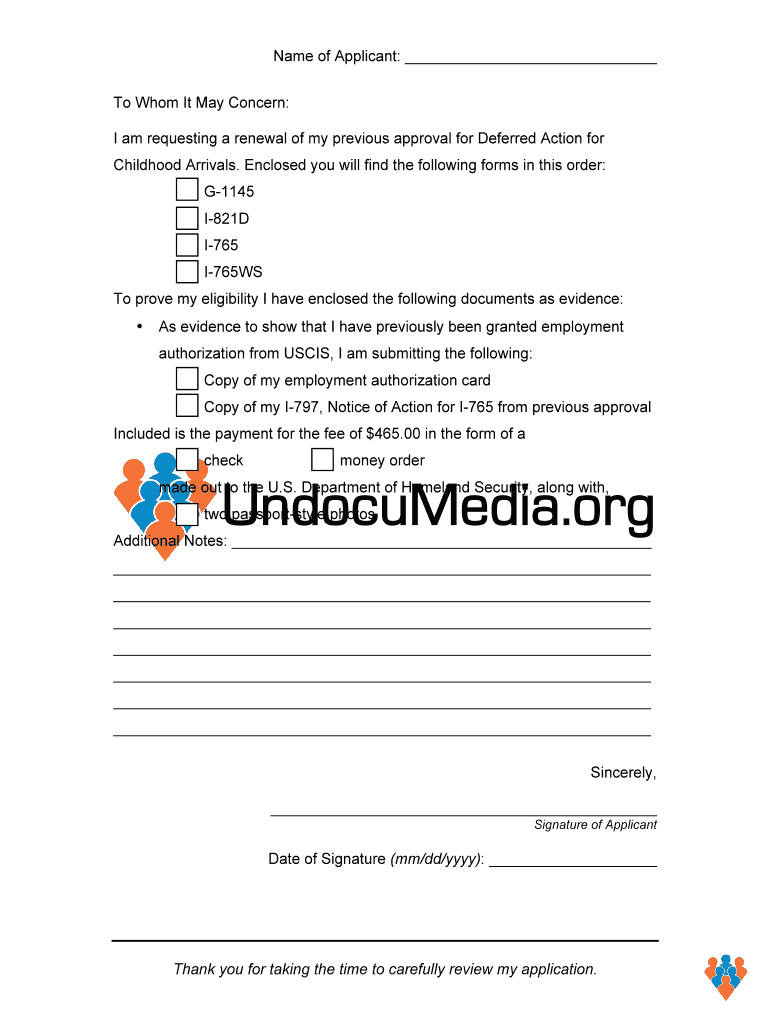
Wing forms in this order: G-1145 I-821D I-765 I-765WS To prove my eligibility I have enclosed the following documents as evidence: • As evidence to show that I have previously been granted employment authorization from USCIS, I am submitting the following: Copy of my employment authorization card Copy of my I-797, Notice of Action for I-765 from previous approval Included is the payment for the fee of $465.00 in the form of a check money order made out to the U.S. Department of Homeland Se.
Loading

Open form follow the instructions

Easily sign the form with your finger

Send filled & signed form or save
How to fill out the UndocuMedia Cover Letter online
Filling out the UndocuMedia Cover Letter is an essential step in the process of requesting a renewal for Deferred Action for Childhood Arrivals. This guide will provide you with clear instructions to help you complete the form accurately and confidently.
Follow the steps to complete your UndocuMedia Cover Letter online.
- Click 'Get Form' button to obtain the form and access it in your preferred format.
- Begin by entering your name in the designated field as 'Name of Applicant:'. Make sure your name is spelled correctly, as this will be used for all future correspondence regarding your application.
- In the salutation section, write 'To Whom It May Concern:' to address the form properly.
- Clearly state your request for a renewal of your previous approval for Deferred Action for Childhood Arrivals. You can phrase it as, 'I am requesting a renewal of my previous approval for Deferred Action for Childhood Arrivals.'
- List the enclosed forms in the order they will be submitted. This includes G-1145, I-821D, I-765, and I-765WS. Ensure that each form is correctly named and numbered.
- To prove your eligibility, detail the documents you are enclosing as evidence. This may include a copy of your employment authorization card and a copy of your I-797, Notice of Action for I-765 from previous approval.
- Indicate that you are including payment for the fee of $465.00. Specify the payment method as either a check or money order made out to the U.S. Department of Homeland Security.
- Include any additional items required, such as two passport-style photographs, and make a note of this in your letter.
- In the notes section, provide any additional information that may support your application. Use this area to elaborate on special circumstances or additional context.
- Conclude the letter with a closing statement, such as 'Thank you for taking the time to carefully review my application.'
- Sign the document where indicated in 'Signature of Applicant' and add the date of the signature in the format mm/dd/yyyy.
- Once all fields are completed, ensure to save your changes, then download, print, or share the completed form as needed.
Complete your documents online today for a seamless application process.
Experience a faster way to fill out and sign forms on the web. Access the most extensive library of templates available.
Related content
Mar 14, 2018 — Justino Mora, founder of the popular social media presence UndocuMedia...
Get answers to your most pressing questions about US Legal Forms API.
How do you write an unaddressed cover letter?
To write an unaddressed cover letter, focus on the content rather than the recipient. Start with a strong introduction that outlines the purpose of the letter, followed by clear and concise paragraphs detailing your case. A well-structured UndocuMedia Cover Letter can effectively convey your message, even without a specific addressee.
Do you need a lawyer for form I-751?
You do not necessarily need a lawyer for form I-751, but having one can be advantageous. A knowledgeable attorney can guide you through the process, ensuring that your application is complete and effectively presented. For added support, consider using an UndocuMedia Cover Letter for clear communication of your case's context.
Who can write an immigration letter?
Any individual with knowledge of the specific case can write an immigration letter. This often includes the applicant, family members, and friends who can attest to the applicant's character or circumstances. However, using a professional service to create an UndocuMedia Cover Letter can ensure clarity and compliance with USCIS expectations.
Do I need a cover letter for Daca renewal?
While a cover letter is not mandatory for DACA renewal applications, including one can be beneficial. A well-prepared UndocuMedia Cover Letter can summarize your renewal request and highlight important aspects of your case. This additional context can prompt USCIS to process your renewal more efficiently.
Is a cover letter necessary for USCIS?
A cover letter is not always required for USCIS submissions, but it is highly recommended. It helps to clarify your case details, outlines your supporting documents, and provides a cohesive narrative to your application. Utilizing an UndocuMedia Cover Letter can make your submission stand out, enhancing understanding for the USCIS officer reviewing your case.
Who should write an I-751 cover letter?
Typically, the I-751 cover letter should be written by the couple filing the petition. Both spouses should participate to ensure that the letter accurately reflects their unique relationship and circumstances. Including a well-crafted UndocuMedia Cover Letter can strengthen the overall application and provide important context for USCIS.
How to write a cover letter for USCIS RFE?
Writing a cover letter for a USCIS Request for Evidence (RFE) involves clearly addressing the specific issues raised by USCIS. Start by providing your personal information and case details, followed by a summary of the points that respond to the RFE. Ensure you include any supporting documents and format the letter professionally. An effective UndocuMedia Cover Letter can help present your case in an organized manner.
Do I need a cover letter for form I751?
Yes, including a cover letter for form I751 is beneficial. A well-structured UndocuMedia Cover Letter can clarify your intent and provide context for your application. It allows you to explain your situation and attach important documents, streamlining the review process.
How to start a generic cover letter?
Starting a generic cover letter can be done by expressing your excitement and interest in the position. Begin with a strong opening sentence like, 'I am writing to express my enthusiasm for the Job Title position at Company Name.' This introduction sets a positive tone for your UndocuMedia Cover Letter and encourages the reader to continue.
How to address a generic cover letter?
To effectively address a generic cover letter, begin with 'Dear Job Title Team' or simply 'Dear Team.' This allows your UndocuMedia Cover Letter to communicate directly with the organization while remaining inclusive. Highlight your skills and enthusiasm for the role to make a strong impact.
Use professional pre-built templates to fill in and sign documents online faster. Get access to thousands of forms.
If you believe that this page should be taken down, please follow our DMCA take down process here.