Get Nfirs5.0fta 2000-2026
How it works
-

Open form follow the instructions
-

Easily sign the form with your finger
-

Send filled & signed form or save
How to fill out the NFIRS5.0FTA online
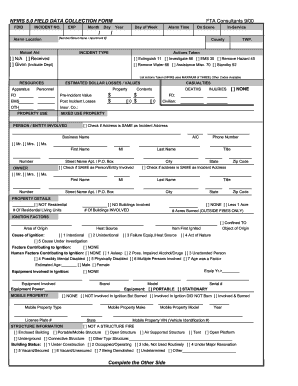
The NFIRS5.0FTA form is essential for documenting fire incidents and ensuring accurate reporting. Understanding how to complete this form online is crucial for all users involved in fire reporting. This guide will walk you through each section of the NFIRS5.0FTA, providing clear and helpful instructions.
Follow the steps to accurately complete the NFIRS5.0FTA form.
- Press the ‘Get Form’ button to access the NFIRS5.0FTA form and open it in your preferred digital editor.
- Begin by entering the FDID and Incident Number. Ensure these identifiers are unique to avoid mix-ups.
- Fill in the date of the incident using the Month, Day, and Year fields. Additionally, select the Day of the Week.
- Input the Alarm Time and On Scene time, along with the specific Alarm Location that includes the street number, name, and apartment number if applicable.
- Record the Incident Type and any Mutual Aid information if provided. Be precise to classify the incident correctly.
- In the Actions Taken section, check the relevant actions performed. You can select from options like Extinguishing, Investigating, or EMS response. List any other actions taken if necessary.
- Next, enter the resources used during the incident, including Personnel and Apparatus. Record estimated dollar losses related to Property and Contents.
- Complete the Casualties section by indicating the number of injuries and deaths, if applicable. If there are none, check the 'None' option.
- Detail the Person or Entity Involved by entering their business name, contact information, and whether their address is the same as the incident address.
- Fill out the Property Details section, including the number of residential units and any additional specific property information.
- Document Ignition Factors by identifying the area of origin, cause of ignition, and any human or equipment factors contributing to the fire.
- Complete the Structure Information section, detailing the type and status of the structure affected by the incident.
- Discuss the presence and effectiveness of detectors in the Detectors section. Provide details on any automatic extinguishing systems if applicable.
- In the Narrative section, provide a detailed description of the incident for record purposes.
- Once all sections are complete, save your changes, print the document, or share it as needed.
Start filling out the NFIRS5.0FTA form online today to ensure accurate incident reporting.
Code 622 in NFIRS denotes 'Vehicle Fire.' This code is essential for tracking fires that occur in vehicles, whether they involve cars, trucks, or other types of transportation. Reporting these incidents allows authorities to identify patterns and implement safety measures. By integrating NFIRS5.0FTA into your reporting process, you can ensure that vehicle fire data is accurately captured.