Loading
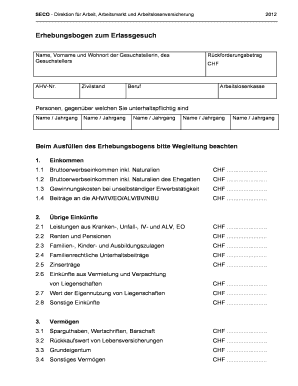
Get Tcnet Seco
How it works
-

Open form follow the instructions
-

Easily sign the form with your finger
-

Send filled & signed form or save
How to fill out the Tcnet Seco online
Filling out the Tcnet Seco form online can be a straightforward process when you follow the proper steps. This guide provides clear instructions to help you navigate each section of the form effectively.
Follow the steps to complete the Tcnet Seco form with ease.
- Click ‘Get Form’ button to access the Tcnet Seco form and open it in your editor.
- Begin by entering the name, first name, and residence of the applicant in the appropriate fields. Ensure accuracy as this information is crucial for processing the request.
- Fill in the AHV number, marital status, and the amount to be refunded in Swiss Francs (CHF) at the designated sections. These details are important for financial assessments.
- Input the occupation and the unemployment insurance fund associated with the applicant. This information helps in determining eligibility.
- List all individuals you are responsible for providing support to. Fill in their names and years of birth accurately.
- Proceed to the income section. Enter your gross employment income, including benefits such as meals or accommodations, as per the instructions provided. Ensure you fill in your spouse's income in the next field if applicable.
- Continually fill in details regarding any income deductions and contributions, including specific amounts related to social insurance. Adherence to local regulations is essential here.
- In the assets section, record all savings, securities, cash, and other relevant financial data. Be mindful of indicating the value of any properties you own.
- After documenting income and assets, you will need to provide details on outstanding debts and expenses associated with providing support. Ensure all figures are accurate.
- Finally, complete the form by affirming the accuracy of your information by signing it and providing the date and place of submission. You can then save changes, download, or print the document for your records.
Complete your Tcnet Seco form online today for efficient processing.
A score of 400 or higher for the majority of DSST tests is considered passing. The minimum is 200 and the maximum is 600. A score of 400 is comparable to earning a “C” grade on a test which would be considered passing. DSST tests are pass/fail and do not affect student's GPAs. DANTES Subject Standardized Tests (DSST) - National University nu.edu https://.nu.edu › student-services › testing-services nu.edu https://.nu.edu › student-services › testing-services
Industry-leading security and compliance
US Legal Forms protects your data by complying with industry-specific security standards.
-
In businnes since 199725+ years providing professional legal documents.
-
Accredited businessGuarantees that a business meets BBB accreditation standards in the US and Canada.
-
Secured by BraintreeValidated Level 1 PCI DSS compliant payment gateway that accepts most major credit and debit card brands from across the globe.