Loading
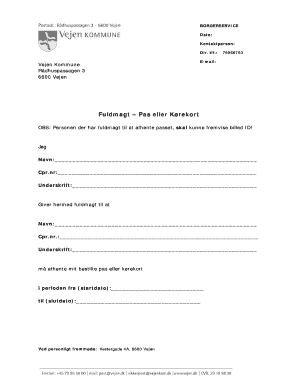
Get Fuldmagt Skabelon
How it works
-

Open form follow the instructions
-

Easily sign the form with your finger
-

Send filled & signed form or save
How to fill out the Fuldmagt Skabelon online
Filling out the Fuldmagt Skabelon is essential for granting someone the authority to collect your passport or driver's license on your behalf. This guide will provide clear, step-by-step instructions to help you complete the form effectively and confidently.
Follow the steps to fill out the Fuldmagt Skabelon online.
- Press the ‘Get Form’ button to access the form and display it in your online editor.
- In the first section, enter your name in the designated field for 'Navn'.
- Next, input your CPR number in the field labeled 'Cpr.nr'.
- Sign the form in the section labeled 'Underskrift' to authorize your request.
- Proceed to the next section to grant authority by entering the name of the person you are giving permission to for collection.
- Input the second person's CPR number in the field labeled 'Cpr.nr.'.
- The second person must also sign in the section marked 'Underskrift'.
- In the relevant fields, specify the start and end date of the authorization period.
- Ensure that all information is correct, then save your changes, and choose to download or print the completed form.
Start filling out your documents online to streamline your process.