Loading
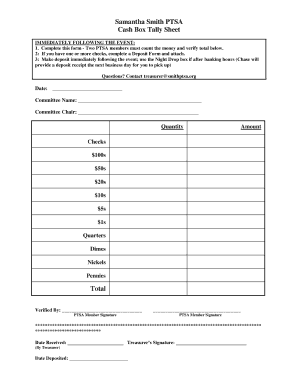
Get Samantha Smith Ptsa Cash Box Tally Sheet Total
How it works
-

Open form follow the instructions
-

Easily sign the form with your finger
-

Send filled & signed form or save
How to fill out the Samantha Smith PTSA Cash Box Tally Sheet Total online
Filling out the Samantha Smith PTSA Cash Box Tally Sheet Total is a critical task that ensures proper tracking of funds collected during events. This guide provides clear, step-by-step instructions to help you complete the form accurately and efficiently.
Follow the steps to effectively complete the tally sheet online.
- Click ‘Get Form’ button to obtain the form and open it in the editor.
- Begin by entering the date in the designated field at the top of the form. This is important for record-keeping and tracking purposes.
- Next, fill in the committee name and the name of the committee chair. This information identifies the event related to the cash box tally.
- For each category listed (such as $100s, $50s, $20s, etc.), enter the quantity of each denomination collected. This allows for a detailed breakdown of the funds.
- Once all quantities are entered, calculate the total amount. Ensure that this is done accurately for financial accountability.
- Both PTSA members present during the cash counting must provide their signatures in the specified fields to verify the accuracy of the total.
- If any checks are included, complete a Deposit Form as well and attach it to the tally sheet.
- Submit the completed form immediately after the event, either in the Night Drop box for after-hours or by taking it to the bank.
- Finally, ensure to save your changes and consider downloading or printing the form for your records.
Complete your documents online today to ensure timely and accurate submissions!