Loading
Get Saime Com Gob
How it works
-

Open form follow the instructions
-

Easily sign the form with your finger
-

Send filled & signed form or save
How to fill out the Saime Com Gob online
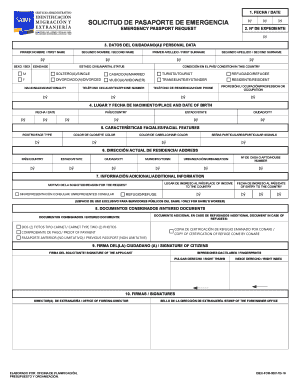
This guide provides clear and concise instructions on how to fill out the Saime Com Gob online. Whether you are applying for an emergency passport or seeking to renew your documentation, our detailed steps will assist you in navigating the form with confidence.
Follow the steps to complete the Saime Com Gob form
- Press the ‘Get Form’ button to obtain the Saime Com Gob form and access it in your preferred editing environment.
- Begin by entering the date of your application in the 'Fecha / Date' section. Ensure that this date reflects when you are submitting the request.
- In the ‘Nº de Expediente’ field, provide your case number if you have one. This number helps the authorities track your application.
- Fill out your personal data in the ‘Datos Del Ciudadano(a) / Personal Data’ section. Enter your first and second names, sex, age, first and second surnames, marital status, nationality, and contact numbers. Use inclusive language where applicable.
- Complete the ‘Lugar y Fecha de Nacimiento / Place and Date of Birth’ section by specifying your date of birth, country, state, and city of birth.
- In the ‘Características Faciales / Facial Features’ section, describe your face type, eye color, hair color, and any particular signals or distinguishing marks.
- Provide your current address in the ‘Dirección Actual de Residencia / Address’ section, including country, state, city, municipality, and house number.
- In the ‘Información Adicional / Additional Information’ section, indicate where you entered the country, your reason for application, and your date of entry.
- Upload the required documents under ‘Documentos Consignados / Entered Documents’. Ensure you include two ID photos, proof of payment, and any additional documents if applicable.
- Sign the form in the ‘Firma Del(LA) Ciudadano(a) / Signature of Citizens’ section. Ensure your fingerprint is provided where requested.
- Finally, review all enclosed signatures and documents before saving your changes, downloading a copy, printing, or sharing the completed form as required.
Complete your documents online today and ensure your application is submitted accurately.
Related links form
City Of Swan GENERAL CONDITIONS OF CONTRACT For Minor Works And Services
(Professional And Technical Units) And AMPA
FORM MO-1 - Missouri Department Of Transportation - Missouriruralpublictransportation
FORM MO-1 MISSOURI DEPARTMENT OF TRANSPORTATION MOTOR CARRIER SERVICES PO BOX 893, 1320 CREEK TRAIL
SAIME (formerly ONIDEX) is a Venezuelan government institution, traditionally in charge of Civil registry services. The name derives from the Spanish acronym for Servicio Administrativo de Identificación, Migración y Extranjería (Administrative Service of Identification, Migration and Foreigners).