Loading
Form preview
  • US Legal Forms
  • Form Library
  • More Forms
  • More Uncategorized Forms
  • Performance Verification Procedure Alaris Gp (guardrails ...

Get Performance Verification Procedure Alaris Gp (guardrails ...

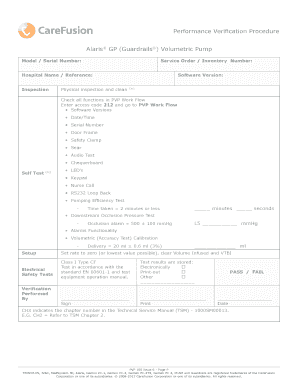
Performance Verification Procedure Alaris GP (Guardrails) Volumetric Pump Model / Serial Number: Service Order / Inventory Number: Hospital Name / Reference: Inspection Physical inspection and clean.

How it works

  1. Open form

    Open form follow the instructions

  2. Easily sign form

    Easily sign the form with your finger

  3. Share form

    Send filled & signed form or save

How to fill out the Performance Verification Procedure Alaris GP (Guardrails) online

This guide provides a clear and structured approach to completing the Performance Verification Procedure for the Alaris GP (Guardrails) volumetric pump. By following these instructions, users will be able to accurately fill out the necessary sections of the form online.

Follow the steps to complete the form effectively.

  1. Press the ‘Get Form’ button to access the form and open it in your editor.
  2. Begin by entering the model and serial number of the pump in the designated fields. Ensure that these details are accurate to facilitate proper identification.
  3. Fill in the service order or inventory number. This will help track the maintenance history and service records associated with the device.
  4. Provide the hospital name or relevant reference. This is crucial for organizational purposes and to link the verification process to the appropriate facility.
  5. Conduct a physical inspection and document any observations in the inspection section. This includes checking the software version and confirming all functions in the PVP workflow. Enter access code 212 to proceed.
  6. Perform self-tests and fill in the results for each test conducted, including LED functionality, keypad response, and alarm tests. Record your findings in the respective fields.
  7. Complete the volumetric accuracy test and note the delivery measurement in the designated space. Ensure compliance with the standards outlined.
  8. Indicate whether the test results are stored electronically, as a print-out, or in another format, and specify which method you chose.
  9. Finalize the document by signing and printing your name in the appropriate fields. Mark the pass or fail section based on the results of the verification process.
  10. Record the date of completion. Remember to save your changes before you exit the editor.
  11. Finally, download, print, or share the completed form as needed to keep a record of the verification process.

Take action now to complete your Performance Verification Procedure online and ensure the accuracy of your documentation.

Get form

Experience a faster way to fill out and sign forms on the web. Access the most extensive library of templates available.
Get form

Related content

Alaris Capture Pro Software - Connecticut - CT.gov
Oct 18, 2019 — in debt to the Town of Greenwich for non-performance of any contract, or...
Learn more
Microbiology Solutions Resource Library - BD
Diagnostic and procedure trays · Peritoneal and pleural drainage · Jamshidi bone...
Learn more

Related links form

Sample Of Income Tax Return Absence Or Early Dismissal Form - Sacred Heart School GED Tests - Embassy Of The United States Riyadh, Saudi Arabia - Riyadh Usembassy Shared Teaching Form

Questions & Answers

Get answers to your most pressing questions about US Legal Forms API.

Contact support

Alaris® System 1. Press and hold the Tamper Resistance Control on the rear of the Alaris PC unit for three seconds. 2. When the keypad is unlocked, a PANEL UNLOCKED prompt displays on the main screen of the Alaris PC unit.

Alaris® Pump module FAQs maximum of 525 mmHg. Pressure must reach hospital established pressure limit before occlusion warning will alarm. For limits from 50 to 175 mmHg, the pressure limit is set relative to the pressure measured when Start is pressed. For limits of 200 mmHg and above, the limit is absolute.

Press and hold the Tamper Resistance Control on the rear of the Alaris PC unit for three seconds. 2. When the keypad is unlocked, a PANEL UNLOCKED prompt displays on the main screen of the Alaris PC unit. The PANEL UNLOCKED prompt remains on the screen for three seconds.

RS232/Nursecall connector (cover removed for clarity) Release lever for rotating cam Folded pole clamp Rotating cam to lock onto horizontal rectangular bars. approximately 3 seconds to switch the pump OFF.

To silence safety alarm tone, press SILENCE key. The Alaris PCA module will remain silent approximately two minutes and will sound again.

0:04 0:33 Locking the Keypad, Z-800F - YouTube YouTube Start of suggested clip End of suggested clip They can't because the panel is locked to unlock it same thing we're going to hit the tens down keyMoreThey can't because the panel is locked to unlock it same thing we're going to hit the tens down key in the clear panel unlocked so now it's unlocked. So I can stop my infusion.

Get This Form Now!

Use professional pre-built templates to fill in and sign documents online faster. Get access to thousands of forms.
Get form
If you believe that this page should be taken down, please follow our DMCA take down processhere.

Industry-leading security and compliance

US Legal Forms protects your data by complying with industry-specific security standards.
  • In businnes since 1997
    25+ years providing professional legal documents.
  • Accredited business
    Guarantees that a business meets BBB accreditation standards in the US and Canada.
  • Secured by Braintree
    Validated Level 1 PCI DSS compliant payment gateway that accepts most major credit and debit card brands from across the globe.
Get Performance Verification Procedure Alaris GP (Guardrails ...
Get form
  • Adoption
  • Bankruptcy
  • Contractors
  • Divorce
  • Home Sales
  • Employment
  • Identity Theft
  • Incorporation
  • Landlord Tenant
  • Living Trust
  • Name Change
  • Personal Planning
  • Small Business
  • Wills & Estates
  • Packages A-Z
  • Affidavits
  • Bankruptcy
  • Bill of Sale
  • Corporate - LLC
  • Divorce
  • Employment
  • Identity Theft
  • Internet Technology
  • Landlord Tenant
  • Living Wills
  • Name Change
  • Power of Attorney
  • Real Estate
  • Small Estates
  • Wills
  • All Forms
  • Forms A-Z
  • Form Library
  • Legal Hub
  • About Us
  • Help Portal
  • Legal Resources
  • Blog
  • Affiliates
  • Contact Us
  • Delete My Account
  • Site Map
  • Industries
  • Forms in Spanish
  • Localized Forms
  • State-specific Forms
  • Forms Kit
  • Real Estate Handbook
  • All Guides
  • Notarize
  • Incorporation services
  • For Consumers
  • For Small Business
  • For Attorneys
  • USLegal
  • FormsPass
  • pdfFiller
  • signNow
  • altaFlow
  • DocHub
  • Instapage
Form Packages
  • Adoption
  • Bankruptcy
  • Contractors
  • Divorce
  • Home Sales
  • Employment
  • Identity Theft
  • Incorporation
  • Landlord Tenant
  • Living Trust
  • Name Change
  • Personal Planning
  • Small Business
  • Wills & Estates
  • Packages A-Z
Form Categories
  • Affidavits
  • Bankruptcy
  • Bill of Sale
  • Corporate - LLC
  • Divorce
  • Employment
  • Identity Theft
  • Internet Technology
  • Landlord Tenant
  • Living Wills
  • Name Change
  • Power of Attorney
  • Real Estate
  • Small Estates
  • Wills
  • All Forms
  • Forms A-Z
  • Form Library
Customer Service
  • Legal Hub
  • About Us
  • Help Portal
  • Legal Resources
  • Blog
  • Affiliates
  • Contact Us
  • Delete My Account
  • Site Map
  • Industries
  • Forms in Spanish
  • Localized Forms
  • State-specific Forms
  • Forms Kit
Legal Guides
  • Real Estate Handbook
  • All Guides
Prepared for you
  • Notarize
  • Incorporation services
Our Customers
  • For Consumers
  • For Small Business
  • For Attorneys
Our Sites
  • USLegal
  • FormsPass
  • pdfFiller
  • signNow
  • altaFlow
  • DocHub
  • Instapage
Social Media
Call us now toll free:
+1 833 426 79 33
As seen in:
© Copyright 1999-2026 airSlate Legal Forms, Inc. 3720 Flowood Dr, Flowood, Mississippi 39232
  • Your Privacy Choices
  • Terms of Service
  • Privacy Notice
  • Content Takedown Policy
  • Bug Bounty Program