Loading
Form preview
  • US Legal Forms
  • Other Templates
  • More Forms
  • More Uncategorized Forms
  • Out Of Stock Material Certification

Get Out Of Stock Material Certification

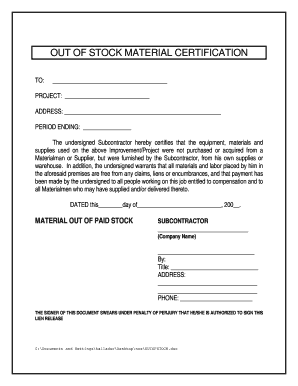
OUT OF STOCK MATERIAL CERTIFICATION TO: PROJECT: ADDRESS: PERIOD ENDING: The undersigned Subcontractor hereby certifies that the equipment, materials and supplies used on the above Improvement/Project.

How it works

  1. Open form

    Open form follow the instructions

  2. Easily sign form

    Easily sign the form with your finger

  3. Share form

    Send filled & signed form or save

How to fill out the Out Of Stock Material Certification online

This guide provides clear, step-by-step instructions for completing the Out Of Stock Material Certification online. By following these instructions, users will be able to accurately fill out the certification form with confidence.

Follow the steps to complete the Out Of Stock Material Certification online.

  1. Click ‘Get Form’ button to obtain the form and open it in the online editor.
  2. Begin by entering the details in the 'To' section. Write the name of the entity or individual your certification is addressing.
  3. In the 'Project' field, specify the name of the project related to the certification.
  4. Fill in the 'Address' section with the physical location where the project is taking place, ensuring it is accurate.
  5. In the 'Period Ending' section, indicate the date that signifies the completion of the material being certified.
  6. Read the certification statement. Ensure you understand that you are certifying that the materials were sourced from your own supplies.
  7. Complete the 'Subcontractor' section by writing your or your company's name.
  8. Sign the document in the designated area. This indicates your authorization to sign the lien release.
  9. Include your title in the space provided after your signature.
  10. Fill out your address and phone number in the respective sections to provide contact information.
  11. Finally, review all provided information for accuracy. Once confirmed, proceed to save changes, download, print, or share the completed form as required.

Complete your Out Of Stock Material Certification online with ease today.

Get form

Experience a faster way to fill out and sign forms on the web. Access the most extensive library of templates available.
Get form

Related content

[PDF] Project Materials Certification Guide for...
It is recommended that the material certification process begin before the final payment...
Learn more
Certification & Foundation FAQ - Clean Plant...
Certified plant material can be purchased from outside of the state, but the stock must...
Learn more
UL (safety organization) - Wikipedia
UL LLC is a global safety certification company headquartered in Northbrook, Illinois....
Learn more

Related links form

Leaf Filter Operation And Use Training Notes - Lifetime Reliability Agilisys Digital Platform Terms And Conditions Base Template Requesting Your Employee & Personnel Records (Sample Form 2018) Data Centre Lease Draft Heads Of Terms 5NDCL3.pdf - Gov.UK

Questions & Answers

Get answers to your most pressing questions about US Legal Forms API.

Contact support

The most direct route to get a share certificate is to contact the transfer agent for the stock. You can find a stock's transfer agent listed on the investor relations tab of the company's website, or by calling the investor relations department directly.

The easiest way to get a stock certificate is via a broker, but be prepared to pay for it. The simplest way to get a stock certificate today is to ask your broker. If you bought your shares through a brokerage firm, it will have an account with your name and the number of shares you purchased.

Most publicly traded companies no longer offer stock certificates. These are usually large corporations that now issue electronic or digital shares. Electronic shares are easy to trade because the broker doesn't have to wait to receive the stock certificate from the investor.

company and does not issue stock certificates. For your convenience, shares purchased under CIP will be maintained by Computershare in your name in non-certificated (book-entry) form.

Stock certificates are generally divided into two forms: registered stock certificates and bearer stock certificates. A registered stock certificate is normally only evidence of title, and a record of the true holders of the shares will appear in the stockholder's register of the corporation.

They may also include an authenticity seal. Today, most businesses only issue stock certificates upon request. Still, you could request a copy directly from the company or through a lawyer.

The company secretary is responsible for issuing stock certificates, but the certificate has to be signed by two directors. In some cases, one director signs along with the company secretary. Companies having only one director will have to invite a witness to attest the signature.

Get This Form Now!

Use professional pre-built templates to fill in and sign documents online faster. Get access to thousands of forms.
Get form
If you believe that this page should be taken down, please follow our DMCA take down processhere.
Get Out Of Stock Material Certification
Get form
  • Adoption
  • Bankruptcy
  • Contractors
  • Divorce
  • Home Sales
  • Employment
  • Identity Theft
  • Incorporation
  • Landlord Tenant
  • Living Trust
  • Name Change
  • Personal Planning
  • Small Business
  • Wills & Estates
  • Packages A-Z
  • Affidavits
  • Bankruptcy
  • Bill of Sale
  • Corporate - LLC
  • Divorce
  • Employment
  • Identity Theft
  • Internet Technology
  • Landlord Tenant
  • Living Wills
  • Name Change
  • Power of Attorney
  • Real Estate
  • Small Estates
  • Wills
  • All Forms
  • Forms A-Z
  • Other Templates
  • Legal Hub
  • About Us
  • Help Portal
  • Legal Resources
  • Blog
  • Affiliates
  • Contact Us
  • Delete My Account
  • Site Map
  • Industries
  • Forms in Spanish
  • Localized Forms
  • State-specific Forms
  • Forms Kit
  • Real Estate Handbook
  • All Guides
  • Notarize
  • Incorporation services
  • For Consumers
  • For Small Business
  • For Attorneys
  • USLegal
  • FormsPass
  • pdfFiller
  • signNow
  • altaFlow
  • DocHub
  • Instapage
Form Packages
  • Adoption
  • Bankruptcy
  • Contractors
  • Divorce
  • Home Sales
  • Employment
  • Identity Theft
  • Incorporation
  • Landlord Tenant
  • Living Trust
  • Name Change
  • Personal Planning
  • Small Business
  • Wills & Estates
  • Packages A-Z
Form Categories
  • Affidavits
  • Bankruptcy
  • Bill of Sale
  • Corporate - LLC
  • Divorce
  • Employment
  • Identity Theft
  • Internet Technology
  • Landlord Tenant
  • Living Wills
  • Name Change
  • Power of Attorney
  • Real Estate
  • Small Estates
  • Wills
  • All Forms
  • Forms A-Z
  • Other Templates
Customer Service
  • Legal Hub
  • About Us
  • Help Portal
  • Legal Resources
  • Blog
  • Affiliates
  • Contact Us
  • Delete My Account
  • Site Map
  • Industries
  • Forms in Spanish
  • Localized Forms
  • State-specific Forms
  • Forms Kit
Legal Guides
  • Real Estate Handbook
  • All Guides
Prepared for you
  • Notarize
  • Incorporation services
Our Customers
  • For Consumers
  • For Small Business
  • For Attorneys
Our Sites
  • USLegal
  • FormsPass
  • pdfFiller
  • signNow
  • altaFlow
  • DocHub
  • Instapage
Social Media
Call us now toll free:
+1 833 426 79 33
As seen in:
© Copyright 1999-2026 airSlate Legal Forms, Inc. 17 Station Street, Ste. 203, Brookline, MA 02445
  • Your Privacy Choices
  • Terms of Service
  • Privacy Notice
  • Content Takedown Policy
  • Bug Bounty Program