Loading
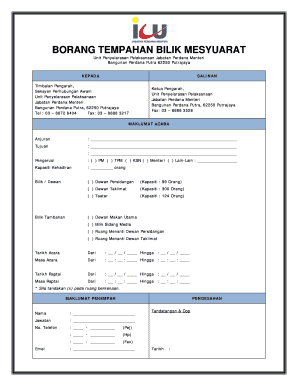
Get Borang Tempahan Bilik Mesyuarat
How it works
-

Open form follow the instructions
-

Easily sign the form with your finger
-

Send filled & signed form or save
How to fill out the Borang Tempahan Bilik Mesyuarat online
Filling out the Borang Tempahan Bilik Mesyuarat online is a straightforward process that helps users reserve meeting rooms efficiently. This guide will provide you with step-by-step instructions to complete the form accurately and effectively.
Follow the steps to complete the Borang Tempahan Bilik Mesyuarat online.
- Press the ‘Get Form’ button to access the Borang Tempahan Bilik Mesyuarat and open it in your chosen editing tool.
- Begin by filling in the 'Maklumat Acara' section. Provide the event organizer's name in the designated space and specify the purpose of the event. Clearly write down any necessary details for clarity.
- Indicate the chairperson by selecting one of the options: Prime Minister (PM), Deputy Prime Minister (TPM), Chief Secretary (KSN), Minister, or Other. If 'Other' is selected, please provide the relevant name.
- State the expected attendance capacity by filling in the number of people expected to attend the event.
- Select the desired room or hall from the provided options, ensuring to indicate your choice by marking it clearly. Options include: Dewan Persidangan, Dewan Taklimat, or Teater.
- If additional rooms are needed, mark the options for additional rooms such as Dewan Makan Utama, Bilik Sidang Media, Ruang Menanti Dewan Persidangan, or Ruang Menanti Dewan Taklimat.
- Fill in the event date range. Specify the start and end dates clearly in the designated fields.
- Complete the event time range by entering the start and end times in the provided format.
- Similarly, enter the rehearsal date and time details following the same format as the event schedule.
- Provide the necessary personal information under the 'Maklumat Penempah' section. Include your name, position, phone number, and fax number as required.
- Input your email address to ensure that you can be contacted regarding the reservation.
- Finally, provide your signature as well as the organizational stamp, and enter the date of completion before submitting the form.
Start filling out the Borang Tempahan Bilik Mesyuarat online today to streamline your event planning process.