Loading
Form preview
  • US Legal Forms
  • Other Templates
  • More Forms
  • More Uncategorized Forms
  • Electronic Funds Transfer Form - Meridian Health Plan

Get Electronic Funds Transfer Form - Meridian Health Plan

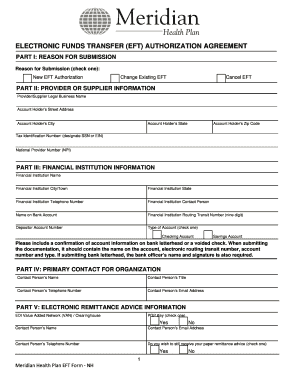
ELE ECTRONIC FUNDS TRANSF C S FER (EFT AUTHO T) ORIZATIO AGRE ON EEMENT PAR I: REASO FOR SU RT ON UBMISSIO ON Reaso for Submission (chec one): on ck A New EFT Authorization Change Existing EFT Cancel.

How it works

  1. Open form

    Open form follow the instructions

  2. Easily sign form

    Easily sign the form with your finger

  3. Share form

    Send filled & signed form or save

How to fill out the Electronic Funds Transfer Form - Meridian Health Plan online

This guide provides users with a clear and step-by-step approach to completing the Electronic Funds Transfer Form for Meridian Health Plan online. Follow these instructions to navigate through the form efficiently and ensure that all necessary information is submitted correctly.

Follow the steps to fill out the Electronic Funds Transfer Form

  1. Press the ‘Get Form’ button to obtain the Electronic Funds Transfer Form and open it for editing.
  2. In Part I, select the reason for submission by checking one box: 'New EFT Authorization', 'Change Existing EFT', or 'Cancel EFT'.
  3. Proceed to Part II and fill out the Provider or Supplier information, including your legal business name, street address, city, state, zip code, tax identification number (indicating whether it's an SSN or EIN), and your National Provider Number (NPI).
  4. In Part III, provide the Financial Institution information. This includes the name of the financial institution, the city and state where it is located, a telephone number, the contact person's name, the name on the bank account, the routing transit number, and the account number. Indicate whether it is a checking or savings account and ensure to attach the required account verification.
  5. In Part IV, enter the Primary Contact for your organization by providing their name, title, telephone number, and email address.
  6. In Part V, fill out the Electronic Remittance Advice Information, including the EDI Value Added Network (VAN) or clearinghouse, contact person's name, email address, and telephone number. Additionally, indicate your preference for receiving paper remittance advice by checking 'Yes' or 'No'.
  7. In Part VI, read and acknowledge the authorization statement, confirming your authority to enroll the provider identified in this form.
  8. In Part VII, have the authorized or delegated official print their name, enter their telephone number, title, email address, and provide their signature along with the date.
  9. After completing the form, save any changes, then download or print the completed document. Ensure it is accompanied by a voided check or bank letterhead verifying your account information before submission.

Complete your Electronic Funds Transfer Form online today to ensure timely processing.

Get form

Experience a faster way to fill out and sign forms on the web. Access the most extensive library of templates available.
Get form

Related content

Meridian Health Plan of Michigan - State of...
Health Plan Data Certification Form (MSA 2012 (03/13)). • Litigation ... All reports...
Learn more
ELECTRONIC FUNDS TRANSFER
Indicated below are types of Electronic Fund Transfers we are capable of handling, some of...
Learn more
PDF Meridian SL 1 Engineering Update...
For example, the digital line card provides 16 voice and 16 data ports , for a total of 32...
Learn more

Related links form

Job Application Form Questions Checklist Legal Illegal ... - BLR.com APPENDIX B RULES AND REGULATIONS GOVERNING ... - BLR.com Form IT-20X Amended Corporation Income Tax Return For ... Cell Phone Safety Quiz

Questions & Answers

Get answers to your most pressing questions about US Legal Forms API.

Contact support

EFTs usually process funds via an automated clearing house (ACH) while wire transfers are sent directly between one bank and another. Wire transfers have the benefit of being faster and having higher transfer limits than EFT methods, but they carry higher fees and are not reversible.

The Electronic Funds Transfer Authorization Form contains a form that may be used to gather information from your employees that is needed to establish an electronic funds transfer program.

1:17 5:30 Completing the Electronic Funds Transfer (EFT) Agreement - YouTube YouTube Start of suggested clip End of suggested clip Next if you're doing a revalidation check the third box on the right if the change is to send yourMoreNext if you're doing a revalidation check the third box on the right if the change is to send your payments electronically to your organization's. Home office check the box on the top.

Organizations choosing to pay by EFT must submit an Electronic Funds Transfer Authorization form before EFT payments can be processed. Only a Data Bank administrator can authorize, modify, or terminate your organization's EFT account.

Electronic funds transfer (EFT) is a transfer of funds is initiated through an electronic terminal, telephone, computer (including on-line banking) or magnetic tape for the purpose of ordering, instructing, or authorizing a financial institution to debit or credit a consumer's account.

Get This Form Now!

Use professional pre-built templates to fill in and sign documents online faster. Get access to thousands of forms.
Get form
If you believe that this page should be taken down, please follow our DMCA take down processhere.
Get Electronic Funds Transfer Form - Meridian Health Plan
Get form
  • Adoption
  • Bankruptcy
  • Contractors
  • Divorce
  • Home Sales
  • Employment
  • Identity Theft
  • Incorporation
  • Landlord Tenant
  • Living Trust
  • Name Change
  • Personal Planning
  • Small Business
  • Wills & Estates
  • Packages A-Z
  • Affidavits
  • Bankruptcy
  • Bill of Sale
  • Corporate - LLC
  • Divorce
  • Employment
  • Identity Theft
  • Internet Technology
  • Landlord Tenant
  • Living Wills
  • Name Change
  • Power of Attorney
  • Real Estate
  • Small Estates
  • Wills
  • All Forms
  • Forms A-Z
  • Other Templates
  • Legal Hub
  • About Us
  • Help Portal
  • Legal Resources
  • Blog
  • Affiliates
  • Contact Us
  • Delete My Account
  • Site Map
  • Industries
  • Forms in Spanish
  • Localized Forms
  • State-specific Forms
  • Forms Kit
  • Real Estate Handbook
  • All Guides
  • Notarize
  • Incorporation services
  • For Consumers
  • For Small Business
  • For Attorneys
  • USLegal
  • FormsPass
  • pdfFiller
  • signNow
  • altaFlow
  • DocHub
  • Instapage
Form Packages
  • Adoption
  • Bankruptcy
  • Contractors
  • Divorce
  • Home Sales
  • Employment
  • Identity Theft
  • Incorporation
  • Landlord Tenant
  • Living Trust
  • Name Change
  • Personal Planning
  • Small Business
  • Wills & Estates
  • Packages A-Z
Form Categories
  • Affidavits
  • Bankruptcy
  • Bill of Sale
  • Corporate - LLC
  • Divorce
  • Employment
  • Identity Theft
  • Internet Technology
  • Landlord Tenant
  • Living Wills
  • Name Change
  • Power of Attorney
  • Real Estate
  • Small Estates
  • Wills
  • All Forms
  • Forms A-Z
  • Other Templates
Customer Service
  • Legal Hub
  • About Us
  • Help Portal
  • Legal Resources
  • Blog
  • Affiliates
  • Contact Us
  • Delete My Account
  • Site Map
  • Industries
  • Forms in Spanish
  • Localized Forms
  • State-specific Forms
  • Forms Kit
Legal Guides
  • Real Estate Handbook
  • All Guides
Prepared for you
  • Notarize
  • Incorporation services
Our Customers
  • For Consumers
  • For Small Business
  • For Attorneys
Our Sites
  • USLegal
  • FormsPass
  • pdfFiller
  • signNow
  • altaFlow
  • DocHub
  • Instapage
Social Media
Call us now toll free:
+1 833 426 79 33
As seen in:
© Copyright 1999-2026 airSlate Legal Forms, Inc. 17 Station Street, Ste. 203, Brookline, MA 02445
  • Your Privacy Choices
  • Terms of Service
  • Privacy Notice
  • Content Takedown Policy
  • Bug Bounty Program