Loading
Get Bank Beneficiary Form
How it works
-

Open form follow the instructions
-

Easily sign the form with your finger
-

Send filled & signed form or save
How to fill out the Bank Beneficiary Form online
Filling out the Bank Beneficiary Form online is a straightforward process that requires accurate information to ensure proper handling of remittances. This guide will provide you with step-by-step instructions to help you complete the form efficiently and correctly.
Follow the steps to fill out the Bank Beneficiary Form correctly
- Click ‘Get Form’ button to obtain the form and open it in the editor.
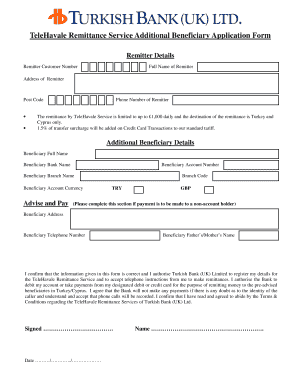
- Begin by entering your Remitter Details, including your Remitter Customer Number, full name, address, post code, and phone number. Ensure all information is accurate as it verifies your identity.
- Proceed to the Additional Beneficiary Details section. Here, you will need to input the Beneficiary Full Name, Beneficiary Bank Name, Beneficiary Account Number, and Beneficiary Branch Name. Make sure to select the correct Beneficiary Account Currency, which could be TRY or GBP.
- If the payment is to be made to a non-account holder, complete the Beneficiary Address and Beneficiary Telephone Number fields. Additionally, include the Beneficiary Father’s/Mother’s Name as required by the form.
- Review the confirmation statement and authorization section. Ensure you understand the terms outlined. You must confirm the correctness of the information provided in the form.
- Sign the form, date it, and type your name in the designated area to complete the application process.
- Finally, save your changes, download the completed form, print it if necessary, or share it as required.
Start filling out your Bank Beneficiary Form online today!
How can I create a beneficiary set? Log in to Online Banking. Click the Payments Tab. Click Create Beneficiary Set. Type the name of your new beneficiary set within the Set Name field. Select the type of beneficiaries to be included in this set i.e. interaccount transfer, international or UK payment. Click Continue.