Loading
Form preview
  • US Legal Forms
  • Form Library
  • More Forms
  • More Uncategorized Forms
  • Covering Letter For Subscriber Registration Application Form

Get Covering Letter For Subscriber Registration Application Form

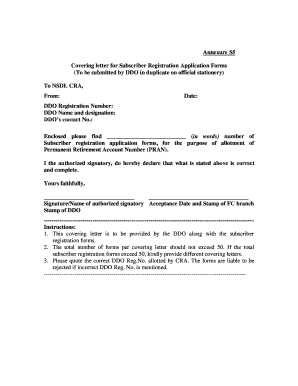
Annexure S5. Covering letter for Subscriber Registration Application Forms. (To be submitted by DDO in duplicate on official stationery). To NSDL CRA,. From:.

How it works

  1. Open form

    Open form follow the instructions

  2. Easily sign form

    Easily sign the form with your finger

  3. Share form

    Send filled & signed form or save

How to fill out the Covering Letter For Subscriber Registration Application Form online

Filling out the Covering Letter For Subscriber Registration Application Form online is a straightforward process that ensures your submission is accurate and complete. This guide offers clear instructions to help you navigate each section of the form effectively.

Follow the steps to complete the form accurately

  1. Click ‘Get Form’ button to obtain the form and open it in the editor.
  2. In the top section, fill in the recipient information by addressing it to NSDL CRA and including your name, date, and either the DDO or PAO registration number, depending on your role.
  3. Include your contact number for further communication and ensure the details are correct to avoid submission errors.
  4. Clearly state the number of Subscriber Registration Application Forms enclosed. Specify the total both in numerical and written format to confirm accuracy.
  5. As an authorized signatory, provide your signature along with your name, acceptance date, and the official stamp of your department to validate the submission.
  6. Review all the information filled in the form to ensure completeness and correctness, particularly the DDO or PAO registration number as errors may lead to rejection.
  7. Once verified, you can save the changes to the form, download it for your records, print it for submission, or share it with the relevant parties.

Complete your Covering Letter For Subscriber Registration Application Form online today to ensure a smooth registration process.

Get form

Experience a faster way to fill out and sign forms on the web. Access the most extensive library of templates available.
Get form

Related content

Form 1 cover letter, Amendment 2 - SEC.gov
Feb 29, 2016 — 2 to Form 1 Application for. Registration as a National Securities...
Learn more
Cover letters - Career Services - UW Bothell
It is appropriate to mention the name of someone who suggested that you apply. Convince...
Learn more
Copyrightable Authorship - US Copyright Office
For guidance in determining who may file an application and who may be ... Register shall...
Learn more

Related links form

Provider Data Submission Tool Based SAE Aerospace Organization Chart Aerospace Standards - Sae County Of Los Angeles Deferred Compensation And Thrift Plan Freeman Outbound Shipping Order Form - Sae

Questions & Answers

Get answers to your most pressing questions about US Legal Forms API.

Contact support

Here are the steps: Step 1: The registration form can be collected offline from any Point of Presence Service Providers. ... Step 2: Further, once you visit the POP-SP, they will guide you on what documents and details will be required to fill it. ... Step 3: Fill the form with the necessary details and submit it!

It is mandatory to fill the Subscriber's Employment details in the application. The employment details should be filled by the respective DDO of the Subscriber and should be verified by the Authorised Signatory. DDO should ratify Overwriting / Striking off of any of the employment details.

Go to site .enps.nsdl.com and select Registration option and go to New Registration and choose appropriate options. You must have an 'Aadhaar number' (with a mobile number registered with Aadhaar). Your KYC in NPS will be done using Aadhaar through One Time Password (OTP) authentication.

Subscriber to dispatch the physical registration form to CRA (NSDL) on below address: Central Recordkeeping Agency (eNPS) NSDL e-Governance Infrastructure Limited, 1st Floor, Times Tower, Kamala Mills Compound, Senapati Bapat Marg, Lower Parel, Mumbai - 400 013, Maharashtra.

Steps to Fill the NPS S2 Form Enter your PAN Card. Enter subscriber's basic details. Mention the reissue of I-PIN & T-PIN (if required). Mention the reissue of the PRAN Card (if required). Mention the nomination details (if required for a change).

Step 1 – Login to your NPS account by visiting https://cra-nsdl.com Step 2 – Go to menu “Demographic Changes” and click on “Update Personal Details” Step 3 – Click on Upload Photo and Signature and follow the steps mentioned below.

How to Fill NPS NSRF Form Personal Details (Name/Father's Name/Mother's Name/Date of Birth, etc.) City and Country of birth. PAN Card Number and Aadhaar Number. Identity Details (Passport number, visa/work permit date of expiry, etc.) Overseas Address and Permanent Address in India.

You need to fill up an NPS contribution instruction slip to contribute offline. Visit your nearest POP-SP or the NPS website to obtain the contribution slip. Mention all the details required, such as the subscriber's name, PRAN number, Date of Birth, contribution amount, and payment mode.

Get This Form Now!

Use professional pre-built templates to fill in and sign documents online faster. Get access to thousands of forms.
Get form
If you believe that this page should be taken down, please follow our DMCA take down processhere.
Get Covering Letter For Subscriber Registration Application Form
Get form
  • Adoption
  • Bankruptcy
  • Contractors
  • Divorce
  • Home Sales
  • Employment
  • Identity Theft
  • Incorporation
  • Landlord Tenant
  • Living Trust
  • Name Change
  • Personal Planning
  • Small Business
  • Wills & Estates
  • Packages A-Z
  • Affidavits
  • Bankruptcy
  • Bill of Sale
  • Corporate - LLC
  • Divorce
  • Employment
  • Identity Theft
  • Internet Technology
  • Landlord Tenant
  • Living Wills
  • Name Change
  • Power of Attorney
  • Real Estate
  • Small Estates
  • Wills
  • All Forms
  • Forms A-Z
  • Form Library
  • Legal Hub
  • About Us
  • Help Portal
  • Legal Resources
  • Blog
  • Affiliates
  • Contact Us
  • Delete My Account
  • Site Map
  • Industries
  • Forms in Spanish
  • Localized Forms
  • State-specific Forms
  • Forms Kit
  • Real Estate Handbook
  • All Guides
  • Notarize
  • Incorporation services
  • For Consumers
  • For Small Business
  • For Attorneys
  • USLegal
  • FormsPass
  • pdfFiller
  • signNow
  • altaFlow
  • DocHub
  • Instapage
Form Packages
  • Adoption
  • Bankruptcy
  • Contractors
  • Divorce
  • Home Sales
  • Employment
  • Identity Theft
  • Incorporation
  • Landlord Tenant
  • Living Trust
  • Name Change
  • Personal Planning
  • Small Business
  • Wills & Estates
  • Packages A-Z
Form Categories
  • Affidavits
  • Bankruptcy
  • Bill of Sale
  • Corporate - LLC
  • Divorce
  • Employment
  • Identity Theft
  • Internet Technology
  • Landlord Tenant
  • Living Wills
  • Name Change
  • Power of Attorney
  • Real Estate
  • Small Estates
  • Wills
  • All Forms
  • Forms A-Z
  • Form Library
Customer Service
  • Legal Hub
  • About Us
  • Help Portal
  • Legal Resources
  • Blog
  • Affiliates
  • Contact Us
  • Delete My Account
  • Site Map
  • Industries
  • Forms in Spanish
  • Localized Forms
  • State-specific Forms
  • Forms Kit
Legal Guides
  • Real Estate Handbook
  • All Guides
Prepared for you
  • Notarize
  • Incorporation services
Our Customers
  • For Consumers
  • For Small Business
  • For Attorneys
Our Sites
  • USLegal
  • FormsPass
  • pdfFiller
  • signNow
  • altaFlow
  • DocHub
  • Instapage
Social Media
Call us now toll free:
+1 833 426 79 33
As seen in:
© Copyright 1999-2026 airSlate Legal Forms, Inc. 3720 Flowood Dr, Flowood, Mississippi 39232
  • Your Privacy Choices
  • Terms of Service
  • Privacy Notice
  • Content Takedown Policy
  • Bug Bounty Program