Loading
Get Tg21
How it works
-

Open form follow the instructions
-

Easily sign the form with your finger
-

Send filled & signed form or save
How to fill out the Tg21 online
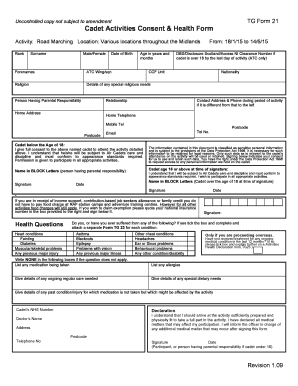
Filling out the Tg21 form is an essential step for participants in cadet activities, ensuring that all relevant personal and health information is accurately reported. This guide provides clear instructions on completing the form online, tailored for all users regardless of their legal experience.
Follow the steps to complete the Tg21 online form effectively.
- Click the ‘Get Form’ button to access the Tg21 document and open it in your preferred online editor.
- Begin by filling in your rank and surname in the designated fields.
- Indicate your gender by selecting 'Male/Female', followed by your date of birth.
- Enter your age in years and months, ensuring accuracy.
- Provide your forenames as they appear on official documents.
- Fill in your ATC Wing/squadron and religion, including any special religious needs you may have.
- List the person who has parental responsibility, including their relationship to you.
- If you are over 18, provide your DBS/Disclosure Scotland/Access NI clearance number.
- Complete your CCF Unit and home address details, making sure to include all relevant contact information.
- In the consent section for cadets under 18, ensure that you (or the person having parental responsibility) provide full consent by signing in block letters and dating the document.
- For cadets aged 18 or above, affirm participation and sign in block letters, including the date.
- Answer health questions truthfully, indicating any relevant conditions with a tick and attaching a separate TG 23 form for each condition if necessary.
- If applicable, list any ongoing medical treatment, medications, allergies, and dietary needs.
- Provide your NHS number, doctor's details, and finally, sign and date the declaration.
- After completing the form, save any changes, download a copy for your records, and consider printing or sharing it as needed.
Complete your Tg21 form online to participate successfully in cadet activities.
TG Form 21. Activity Consent Form – Cadet. Activity. Location.
Industry-leading security and compliance
US Legal Forms protects your data by complying with industry-specific security standards.
-
In businnes since 199725+ years providing professional legal documents.
-
Accredited businessGuarantees that a business meets BBB accreditation standards in the US and Canada.
-
Secured by BraintreeValidated Level 1 PCI DSS compliant payment gateway that accepts most major credit and debit card brands from across the globe.