Loading
Get Sslvcom
How it works
-

Open form follow the instructions
-

Easily sign the form with your finger
-

Send filled & signed form or save
How to fill out the Sslvcom online
Filling out the Sslvcom document requires attention to detail in order to complete the information accurately. This guide provides a clear, step-by-step approach to assist you in successfully filling out the form online.
Follow the steps to complete the Sslvcom form effectively.
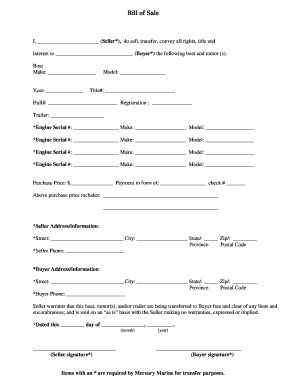
- Click ‘Get Form’ button to obtain the form and open it in the editor.
- Begin by entering the name of the seller in the designated field. Ensure that the full legal name is provided for clarity.
- Next, enter the name of the buyer, ensuring the use of the complete legal name as well.
- Fill out the boat details, including make, year, model, title number, hull number, and registration number as applicable.
- If applicable, provide the trailer information, ensuring to include any relevant identification numbers.
- List the purchase price in the specified field and indicate the form of payment, including any check number if payment is made via check.
- Include a description of what is included in the purchase price, ensuring all components are accounted for.
- Provide the seller's address details, including the street, city, state, and zip code. Ensure all information is current and accurate.
- Enter the seller's phone number to facilitate communication regarding the transaction.
- Next, complete the buyer’s address information in a similar manner to the seller’s details.
- Fill in the buyer’s phone number to ensure easy contact.
- Ensure to read the warranty statement about the boat, motor, and trailer to understand the terms under which these items are sold.
- Finally, enter the date of signing and include the signatures of both the seller and the buyer where indicated.
- Once completed, save any changes, and utilize the options to download, print, or share the form as needed.
Complete your Sslvcom document online today for a smooth transaction.
An SSL certificate secures your website to protect important customer data from cybercriminals. If you collect personal information from customers, whether it's credit card numbers or something as simple as an email address, your website needs an SSL certificate, even if you don't sell anything.