Loading
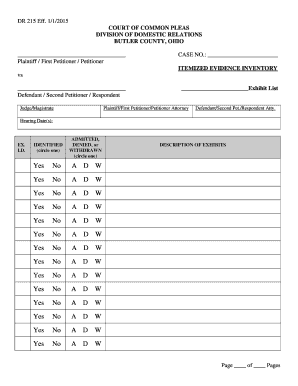
Get Dr215 Itemized Evidence Inventory - Butlercountydrcourtorg
How it works
-

Open form follow the instructions
-

Easily sign the form with your finger
-

Send filled & signed form or save
How to fill out the DR215 Itemized Evidence Inventory - Butlercountydrcourtorg online
Filling out the DR215 Itemized Evidence Inventory is essential for properly documenting evidence in domestic relations cases. This guide will provide you with a clear, step-by-step process for completing this important form online.
Follow the steps to successfully fill out the DR215 form.
- Press the ‘Get Form’ button to access the DR215 Itemized Evidence Inventory and open it in your preferred editor.
- Begin by entering the case number in the appropriate field at the top of the form. This is crucial for associating your document with the correct legal case.
- Fill in the names of the plaintiff/first petitioner and defendant/second petitioner in the designated fields. This identifies the parties involved in the case.
- Indicate the judge or magistrate overseeing the case by filling in the relevant section.
- Record the hearing dates. This will inform all parties of when evidence will be reviewed.
- In the exhibit list section, label each item of evidence. Assign an identification number (Ex. I.D.) for each piece of evidence you are submitting.
- For each exhibit, circle the appropriate status: 'Identified' to confirm it belongs to the case, 'Admitted', 'Denied', or 'Withdrawn' as applicable.
- Ensure all exhibits are described adequately in the 'Description of Exhibits' section, giving enough detail for clarity.
- Upon completing the form, review all entries for accuracy and ensure all necessary data is filled out.
- Finally, save your changes, download the document for your records, or print a copy to share with involved parties.
Complete your documentation process by filling out the DR215 Itemized Evidence Inventory online today!