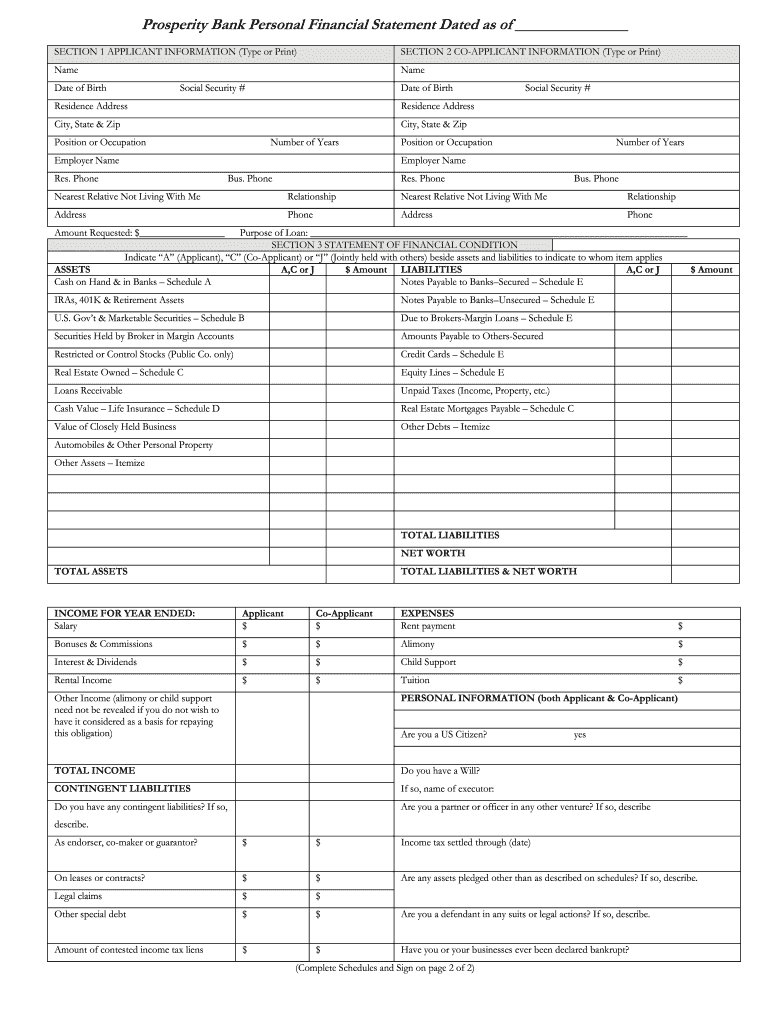
Ame Social Security # Date of Birth Residence Address Residence Address City, State & Zip Social Security # City, State & Zip Position or Occupation Number of Years Employer Name Res. Phone Position or Occupation Number of Years Employer Name Bus. Phone Res. Phone Bus. Phone Nearest Relative Not Living With Me Relationship Nearest Relative Not Living With Me Relationship Address Phone Address Phone Amount Requested: $_________________ Purpose of Loan: ____________________.
Loading

Open form follow the instructions

Easily sign the form with your finger

Send filled & signed form or save
How to fill out the Prosperity Bank Personal Financial Statement online
Completing the Prosperity Bank Personal Financial Statement online is a straightforward process that allows users to provide necessary financial information efficiently. This guide will offer step-by-step instructions to help you navigate the form seamlessly.
Follow the steps to complete your Personal Financial Statement effectively.
- Click the 'Get Form' button to obtain the Prosperity Bank Personal Financial Statement and open it in your editor.
- In Section 1, provide the applicant information by entering your name, date of birth, residence address, city, state, and ZIP code, as well as your occupation and contact numbers.
- In Section 2, fill in the co-applicant information, including their name, date of birth, residence address, social security number, occupation, contact numbers, and their nearest relative's details.
- Specify the amount requested and the purpose of the loan in the designated fields.
- In Section 3, indicate whether assets and liabilities belong to the applicant (A), co-applicant (C), or jointly (J) by marking the respective items. Enter the amounts for each asset and liability.
- List all income sources for the year, including salary, bonuses, commissions, rental income, and others in the income section.
- Fill in the expenses section to provide details on your monthly expenditures.
- Complete any required personal information, including whether you have a will and if you have contingent liabilities.
- Review each section for accuracy, ensuring all fields are filled correctly.
- At the end of the document, you can save the changes, download the completed form, print it, or share it as needed.
Complete your Prosperity Bank Personal Financial Statement online today for a streamlined application process.
Experience a faster way to fill out and sign forms on the web. Access the most extensive library of templates available.
Related content
Feb 27, 2025 — As of February 24, 2025, the number of outstanding shares of common stock...
Collect Financial Information: Gather all financial statements, including bank statements...
Mar 9, 2021 — This Report is the bank's 'core' report; 'more' reports include ABN AMRO's...
Get answers to your most pressing questions about US Legal Forms API.
How can I generate my bank statement?
To generate your bank statement, use your bank's online banking system, where you can select a specific period and download your statement as a PDF. If you prefer to receive it by mail, you can request this option through your bank’s customer service. Additionally, a Prosperity Bank Personal Financial Statement is a great tool to help you summarize your finances in one document.
Can you make your own bank statement?
While you can create your version of a bank statement, it’s essential to ensure that it accurately reflects your financial activity. However, it is often advisable to use official statements provided by your bank for validation. A Prosperity Bank Personal Financial Statement can help clarify your finances and gives a structured overview without the potential issues of creating a personal document.
Can apartments detect bank statements?
Yes, apartments often request bank statements to verify your income and financial stability during the application process. They may require recent statements to ensure you can afford your rent. Providing a clear and well-organized Prosperity Bank Personal Financial Statement can help demonstrate your financial reliability.
Is Prosperity Bank a financial institution?
Yes, Prosperity Bank is a recognized financial institution that provides a range of banking services. They offer products such as personal and business loans, savings accounts, and financial planning assistance. For personal finance management, utilizing a Prosperity Bank Personal Financial Statement is a great way to track your financial progress.
How do I get a financial statement from my bank?
You can obtain a financial statement from your bank by logging into your online banking account, where you can usually download or print your statements directly. If you prefer physical copies, visit your local branch or contact customer service for assistance. A Prosperity Bank Personal Financial Statement can also help you summarize your finances effectively.
Does Prosperity Bank do personal loans?
Yes, Prosperity Bank offers personal loans that can help you meet various financial needs. Their loans are designed with competitive rates and flexible terms to assist customers in achieving their goals. When applying, it's beneficial to prepare a Prosperity Bank Personal Financial Statement to outline your financial situation, which helps in the evaluation process.
How to make a personal bank statement?
You can create a personal bank statement by compiling your banking transactions over a specific period. Most banks, including Prosperity Bank, offer online access where you can download or print your transaction history. If you need a formal format, consider using a Prosperity Bank Personal Financial Statement template to present your data professionally.
How to create a personal financial statement?
To create a personal financial statement, you should gather your financial information, including income, expenses, assets, and liabilities. Use a template or software to organize this data into a comprehensive document. Prosperity Bank Personal Financial Statement templates can guide you through the necessary components and ensure you capture all relevant details for a clear financial overview.
What is a personal bank statement?
A personal bank statement is a document that summarizes all transactions for your bank account over a specific period. It typically includes deposits, withdrawals, and account balance information. You can use this statement to track your spending, manage your budget, or apply for loans. For a more detailed view of your finances, consider generating a Prosperity Bank Personal Financial Statement.
What is the fastest way to get a bank statement?
The fastest way to get a bank statement is to access your online banking account. Most banks, including Prosperity Bank, provide instant access to your Personal Financial Statement through their digital platforms. This digital access allows you to retrieve your statement anytime, making it both efficient and convenient.
Use professional pre-built templates to fill in and sign documents online faster. Get access to thousands of forms.
If you believe that this page should be taken down, please follow our DMCA take down process here.