Loading
Form preview
  • US Legal Forms
  • Other Templates
  • Industry Forms
  • Industry Academic Forms
  • Isu Ice Machine Cleaning And Sanitizing Log

Get Isu Ice Machine Cleaning And Sanitizing Log

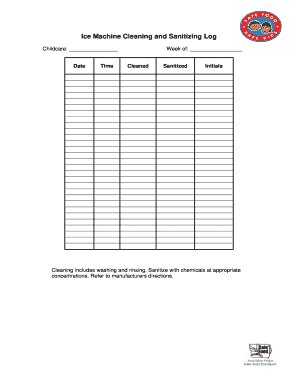
Th chemicals at appropriate concentrations. Refer to manufacturers directions. .

How it works

  1. Open form

    Open form follow the instructions

  2. Easily sign form

    Easily sign the form with your finger

  3. Share form

    Send filled & signed form or save

How to fill out the ISU Ice Machine Cleaning and Sanitizing Log online

The ISU Ice Machine Cleaning and Sanitizing Log is essential for maintaining hygiene and safety standards in ice machine maintenance. This guide provides clear steps to fill out the log effectively online, ensuring compliance with best practices.

Follow the steps to complete the ISU Ice Machine Cleaning and Sanitizing Log online.

  1. Press the ‘Get Form’ button to access the ISU Ice Machine Cleaning and Sanitizing Log and open it in your chosen editing tool.
  2. In the 'Childcare' field, enter the name of the facility or organization responsible for the ice machine.
  3. Fill in the 'Date' field with the specific date when the cleaning and sanitizing occurred.
  4. Specify the 'Time' when the cleaning process started.
  5. Indicate the 'Week of' by noting the corresponding week number for proper record-keeping.
  6. In the 'Cleaned' section, confirm that you have completed the washing and rinsing process as detailed in the log.
  7. In the 'Sanitized' section, ensure that you have sanitized the ice machine with chemicals at the recommended concentrations. It is important to refer to the manufacturer's directions for accurate application.
  8. Sign off on the log by entering your initials in the designated field to verify that you conducted the cleaning and sanitizing process.
  9. Review all entries for accuracy before finalizing the log.
  10. Once completed, you can save changes to the document, download a copy for your records, print the log, or share it with relevant parties.

Start filling out your ISU Ice Machine Cleaning and Sanitizing Log online today to ensure you maintain high hygiene standards.

Get form

Experience a faster way to fill out and sign forms on the web. Access the most extensive library of templates available.
Get form

Related content

NAHEMS Guidelines: Cleaning and Disinfection
The Cleaning and Disinfection Guidelines are a component of APHIS' FAD PReP/NAHEMS...
Learn more
Standard Operating Procedures (SOPs)
Equipment Cleaning and Sanitizing · Foodservice Cleaning and Sanitizing Guide ... Ice...
Learn more
2018 PyeongChang Winter Olympics/Incident Accident
Jul 18, 2025 — On the 8th, the Ministry of Food and Drug Safety said it would carry out...
Learn more

Related links form

TX A&M University at Galveston Abe and Peggy Levy Fellowship Application TX Dripping Springs ISD Confidential Background Form 2018 TX Transcript Request Form TX University Form UT-2 1998

Questions & Answers

Get answers to your most pressing questions about US Legal Forms API.

Contact support

Cleaning and sanitizing an ice machine involves a series of steps. First, disconnect the machine and remove any ice remnants. Use a suitable cleaner on all interior surfaces, followed by proper rinsing. After cleaning, apply a sanitizer and allow it to sit for a specified time. It's wise to maintain an ISU Ice Machine Cleaning and Sanitizing Log to track your cleaning schedules, ensuring your equipment operates smoothly and hygienically.

You can use a commercial-grade sanitizer specifically designed for food equipment to sanitize your ice machine effectively. Make sure to dilute the solution as per the instructions on the product label. The ISU Ice Machine Cleaning and Sanitizing Log can help you keep track of when you perform sanitization, ensuring your ice machine remains clean and safe for use. Routine sanitizing contributes to better ice quality for your customers.

To run the cleaning cycle on a GE ice maker, begin by turning off the ice maker. Then, mix the appropriate cleaning solution according to the instructions provided in the user manual. Engage the cleaning cycle by pressing the necessary buttons, and refer to the ISU Ice Machine Cleaning and Sanitizing Log to document this important maintenance activity. Keeping a record ensures that you maintain a clean and efficient ice maker.

Using vinegar can be an effective way to help clean your ice maker, particularly when it comes to removing mineral buildup. However, it's essential to follow the manufacturer’s guidelines for cleaning. Integrating the ISU Ice Machine Cleaning and Sanitizing Log into your routine can ensure that you track your cleaning progress and protect your equipment. Regular maintenance will extend the life of your ice maker.

Cleaning an ice machine involves removing dirt, dust, and impurities from the unit's surfaces, while sanitizing focuses on killing bacteria and germs. Both steps are essential for maintaining hygiene and ensuring high-quality ice production. The ISU Ice Machine Cleaning and Sanitizing Log will guide you through these processes to ensure each step is documented and executed correctly.

The duration of an ice machine clean cycle can vary, but it generally takes about 30 minutes to an hour. This time includes the actual cleaning, sanitizing, and rinsing processes. Adhering to the ISU Ice Machine Cleaning and Sanitizing Log can help you manage this time effectively, ensuring thorough cleaning without disrupting ice production.

An ice machine cleaning record is a documented log that tracks all cleaning and sanitizing activities performed on the unit. It typically includes dates, procedures followed, and the personnel responsible for the tasks. Maintaining this record using an ISU Ice Machine Cleaning and Sanitizing Log is crucial for compliance and ensuring hygiene standards.

For a bulk ice machine, develop a cleaning schedule based on usage and manufacturer recommendations. Regular cleaning should occur every six months, but high-use machines may require monthly maintenance. Keeping to this schedule will not only enhance ice quality but also align with the ISU Ice Machine Cleaning and Sanitizing Log for record-keeping.

To use an ice machine cleaner and descaler, mix the cleaner with water according to the instructions provided. Pour it into the water reservoir and start a cleaning cycle to effectively remove scale buildup and grime. After the cycle, flush the system with clean water. Make sure to log this cleaning in your ISU Ice Machine Cleaning and Sanitizing Log for optimal maintenance.

Starting a clean cycle on your ice machine typically requires you to power on the machine and access the cleaning mode via the control panel. Refer to your specific machine's manual for precise steps, as they can vary. Running a clean cycle regularly helps ensure sanitary ice production. Don’t forget to note this in your ISU Ice Machine Cleaning and Sanitizing Log.

Get This Form Now!

Use professional pre-built templates to fill in and sign documents online faster. Get access to thousands of forms.
Get form
If you believe that this page should be taken down, please follow our DMCA take down processhere.
Get ISU Ice Machine Cleaning and Sanitizing Log
Get form
  • Adoption
  • Bankruptcy
  • Contractors
  • Divorce
  • Home Sales
  • Employment
  • Identity Theft
  • Incorporation
  • Landlord Tenant
  • Living Trust
  • Name Change
  • Personal Planning
  • Small Business
  • Wills & Estates
  • Packages A-Z
  • Affidavits
  • Bankruptcy
  • Bill of Sale
  • Corporate - LLC
  • Divorce
  • Employment
  • Identity Theft
  • Internet Technology
  • Landlord Tenant
  • Living Wills
  • Name Change
  • Power of Attorney
  • Real Estate
  • Small Estates
  • Wills
  • All Forms
  • Forms A-Z
  • Other Templates
  • Legal Hub
  • About Us
  • Help Portal
  • Legal Resources
  • Blog
  • Affiliates
  • Contact Us
  • Delete My Account
  • Site Map
  • Industries
  • Forms in Spanish
  • Localized Forms
  • State-specific Forms
  • Forms Kit
  • Real Estate Handbook
  • All Guides
  • Notarize
  • Incorporation services
  • For Consumers
  • For Small Business
  • For Attorneys
  • USLegal
  • FormsPass
  • pdfFiller
  • signNow
  • altaFlow
  • DocHub
  • Instapage
Form Packages
  • Adoption
  • Bankruptcy
  • Contractors
  • Divorce
  • Home Sales
  • Employment
  • Identity Theft
  • Incorporation
  • Landlord Tenant
  • Living Trust
  • Name Change
  • Personal Planning
  • Small Business
  • Wills & Estates
  • Packages A-Z
Form Categories
  • Affidavits
  • Bankruptcy
  • Bill of Sale
  • Corporate - LLC
  • Divorce
  • Employment
  • Identity Theft
  • Internet Technology
  • Landlord Tenant
  • Living Wills
  • Name Change
  • Power of Attorney
  • Real Estate
  • Small Estates
  • Wills
  • All Forms
  • Forms A-Z
  • Other Templates
Customer Service
  • Legal Hub
  • About Us
  • Help Portal
  • Legal Resources
  • Blog
  • Affiliates
  • Contact Us
  • Delete My Account
  • Site Map
  • Industries
  • Forms in Spanish
  • Localized Forms
  • State-specific Forms
  • Forms Kit
Legal Guides
  • Real Estate Handbook
  • All Guides
Prepared for you
  • Notarize
  • Incorporation services
Our Customers
  • For Consumers
  • For Small Business
  • For Attorneys
Our Sites
  • USLegal
  • FormsPass
  • pdfFiller
  • signNow
  • altaFlow
  • DocHub
  • Instapage
Social Media
Call us now toll free:
+1 833 426 79 33
As seen in:
© Copyright 1999-2026 airSlate Legal Forms, Inc. 17 Station Street, Suite 303, Brookline, MA 02445
  • Your Privacy Choices
  • Terms of Service
  • Privacy Notice
  • Content Takedown Policy
  • Bug Bounty Program