Loading
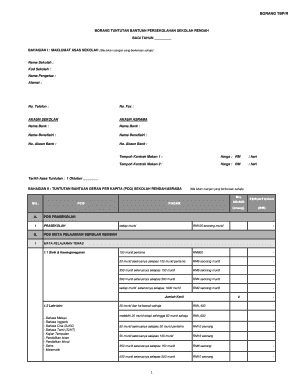
Get Borang Pelarasan Pcg 2020
How it works
-

Open form follow the instructions
-

Easily sign the form with your finger
-

Send filled & signed form or save
How to fill out the Borang Pelarasan Pcg 2020 online
Filling out the Borang Pelarasan Pcg 2020 online is an essential step for schools seeking financial assistance. This guide provides clear, step-by-step instructions to help users complete the form accurately, ensuring a smooth submission process.
Follow the steps to complete the form carefully.
- Click the ‘Get Form’ button to access the form and open it in your editor.
- Begin by filling in the basic information about the school in Bahagian I, including the school name, code, principal's name, address, phone number, fax number, and bank account details, as applicable.
- Continue to Bahagian II, where you will claim support under the Per Capita Grant (PCG). Enter the necessary details regarding the number of students, applicable rates, and calculate the totals for each section.
- Move to Bahagian III to complete the claims for special education needs. Fill out each section regarding the necessary assistance and the corresponding amounts for students with visual, hearing, or learning disabilities.
- In Bahagian IV, provide information on other school support claims. Specify the type of assistance requested and the number of students it applies to, along with the relevant calculations.
- Proceed to Bahagian V where you summarize all claims. Record the total amounts for each type of support you are seeking assistance for.
- Finally, in Bahagian VI, complete the verification section. Include the details and signatures of the school administrator, confirming that all information is accurate and verified.
- Once all sections are completed, save your changes. You can choose to download, print, or share the form as required.
Start filling out the Borang Pelarasan Pcg 2020 online today to ensure your applications for assistance are processed efficiently.