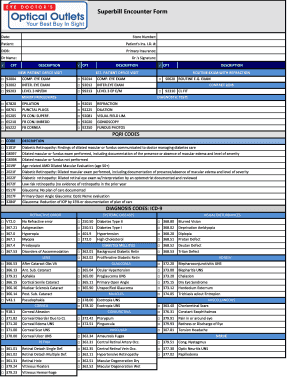
Superbill Encounter Form Date: StoreNumber: Patient: Patient 'sIns.I.D.#: DOB: PrimaryInsurance: DrName: Dr. 'sSignature: CPT DESCRIPTION CPT NEWPATIENTOFFICEVISIT DESCRIPTION CPT DESCRIPTION EST.PATIENTOFFICEVISIT.
Open form follow the instructions
Easily sign the form with your finger
Send filled & signed form or save
How to fill out the Superbill Encounter Form - Opticaloutletsnet online
The Superbill Encounter Form is an essential document for capturing essential patient encounter details in an optical setting. This guide will provide you with clear, step-by-step instructions for successfully completing the form online.
Follow the steps to complete the Superbill Encounter Form effortlessly.
- Press the ‘Get Form’ button to access the Superbill Encounter Form and open it in your preferred online editor.
- Begin by entering the date of the encounter in the designated field. Ensure the date is accurate for proper record-keeping.
- Next, input the store number associated with the encounter. This helps in identifying the location of the service provided.
- Fill in the patient's details including their name and insurance identification number. Make sure to double-check for any typos.
- Record the patient’s date of birth. Correct information is essential for insurance processing and demographic records.
- Indicate the primary insurance provider of the patient. Accurate insurance information is vital to ensure proper billing.
- Complete the referring doctor's name section. This provides clarity on the doctor's involvement in the patient's care.
- Have the doctor sign the form in the designated signature field. Doctor's signatures are necessary for validation.
- Select the appropriate CPT codes related to the encounter by marking the corresponding boxes. Ensure you choose the correct codes for the services rendered.
- Select the applicable PQRI codes, if required, based on the services performed during the encounter. This is important for quality reporting.
- Input the diagnosis codes in the designated section. Select the appropriate ICD-9 codes that correspond with the patient's condition.
- After completing all sections, review the entire form to ensure all information is complete and accurate.
Take the first step in managing your optical encounters by completing the Superbill Encounter Form online today.
Experience a faster way to fill out and sign forms on the web. Access the most extensive library of templates available.
Related content
Note: Provider Inquiry Forms may not be used to: Resubmit corrected claims* ... Vermont...
Get answers to your most pressing questions about US Legal Forms API.
Can I create my own superbill?
You can also make your own counseling superbill template. A complete superbill includes all of the following information: Identifying information about your client: This includes their name, date of birth, address, phone number, and any other information the insurer requires.
How do I generate a superbill?
Superbills can be generated once a clinician creates a draft of a billable note for a client who is set up to bill their insurance, allowing you to quickly generate the form at the end of a session. Nevertheless, be sure that your documentation is always completed and signed as well.
What is a superbill encounter form?
Superbills, also known as "Encounter Forms", "Charge Slips", or "Fee Tickets", are pre-printed forms that are used to document the charges, via procedure codes, associated with a patient visit along with supporting information, such as diagnosis codes, that are required to bill insurance companies.
Can I create a superbill on simple practice?
Click Create Superbill A new superbill will be created with all of the relevant client and practice information that the insurance payer needs. You can then print, download, or email the superbill to your client. To learn more, see How to share billing documents with clients.
What is a superbill in medical terms?
A superbill is used to outline services offered, rendered, and pricing. It can be used in conjunction with a patient receipt to submit to the insurance carrier, confirming the patient has paid for out-of-network services. A superbill may also be referred to as an invoice.
How do I fill out a superbill?
Components of a Superbill Provider's first and last name. Provider NPI number* Office location where the visit took place. Provider phone number. Provider email address. Provider signature. Referring provider name (if applicable) Referring provider NPI number (if applicable)
How do you manually create a superbill on simple practice?
To create a superbill for this client: Go to the client's Client Overview page. Click on the Billing tab. Set the date range to include the sessions that your client needs reimbursement for. Click +Create New, and select Superbill. Verify that the information is correct on the superbill.
Does a superbill need an EIN?
Get yer EIN: In order for your client to be reimbursed, your superbill needs a tax ID on it that identifies you. You could use your SSN here but I sure as heck wouldn't recommend that!
Use professional pre-built templates to fill in and sign documents online faster. Get access to thousands of forms.
If you believe that this page should be taken down, please follow our DMCA take down process here.