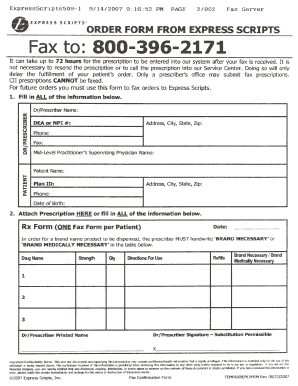
CII prescriptions CANNOT be faxed. For future orders you must use this form to fax orders to Express Scripts. - EXPRESS SCRIPTS. ORDER FORM FROM EXPRESS SCRIPTS Fax to 800-396-2171 It can take up to 72 hours for the prescription to be entered into our system after your fax is received. It is not necessary to resend the prescription or to call the prescription into our Service Center. Doing so will only delay the fulfillment of your patient s order. Only a prescriber s office may submit fax prescriptions. 1. Fill in ALL of the information below. Dr/Prescriber Name 1 1I w m Q u Ul DEAor NPI Address City State Zip Phone Fax c Mid-Level Practitioner s Supervising Physidan Name Patient Name z 1-4 Plan 10 ce l- Date of Birth Rx Form Date ONE Fax Form per Patient In order for a brand name product to be dispensed the prescriber MUST handwrite BRAND NECESSARY or BRAND MEDICALLY NECESSARY in the table below. Strength DrugNcme Qly Directions For Use RefiDs Brand Necessary I Brand Medically Neces....
Open form follow the instructions
Easily sign the form with your finger
Send filled & signed form or save
How to fill out the Order Form from Express Scripts online
Filling out the Order Form from Express Scripts is an essential step in ensuring timely medication management for patients. This guide provides a straightforward approach to completing the form accurately and efficiently.
Follow the steps to complete the Order Form effectively.
- Press the ‘Get Form’ button to access the Order Form and open it in the appropriate editor for completion.
- In the 'Dr/Prescriber Name' section, enter the full name of the prescriber who is providing the prescription.
- Fill in the 'DEA or NPI #' field to include the prescriber’s unique identification number.
- Provide the prescriber's office address in the 'Address, City, State, Zip' section.
- Enter the prescriber's phone and fax numbers in the respective fields.
- If applicable, include the name of the Mid-Level Practitioner's Supervising Physician.
- In the 'Patient Name' section, input the full name of the patient receiving the prescription.
- Fill in the patient's phone number and their complete address in the designated fields.
- Provide the patient's date of birth as required.
- In the 'Rx Form' area, include the order date and specify the medications by entering details in the table, listing the strength, drug name, quantity, directions for use, and refills.
- If a brand name product is required, ensure to handwritten note ‘BRAND NECESSARY’ or ‘BRAND MEDICALLY NECESSARY’ in the appropriate table.
- Include the printed name of the prescriber in the designated area, followed by the prescriber's signature.
- Review the completed form for accuracy, and once satisfied, you can proceed to save the changes, download, print, or share the document as needed.
Complete your documents online today to ensure efficient prescription management.
Experience a faster way to fill out and sign forms on the web. Access the most extensive library of templates available.
Related content
Complete the order form and send to Express Scripts along with prescriptions and payment...
Jan 1, 2021 — Mail order: Express Scripts: P: 800-305-5287. Specialty Pharmacy Program...
Get answers to your most pressing questions about US Legal Forms API.
Does Express Scripts cover Mounjaro for weight loss?
Express Scripts may cover Mounjaro for weight loss, but coverage depends on your specific plan. To find out, review your benefits or contact customer service. If your plan does cover Mounjaro, you can easily place your prescription through the Order Form from Express Scripts. This streamlines the process for obtaining your medication.
How do I order from Express Scripts?
To order from Express Scripts, log into your account and navigate to the Order Form from Express Scripts. Here, you can enter your medication details and select the items you need. After confirming your order, you will receive updates on your delivery status. This process makes accessing your medications quick and simple.
How do I get started with Express Scripts?
Getting started with Express Scripts is straightforward. First, create an online account on their website. After logging in, you can utilize the Order Form from Express Scripts to manage your prescriptions and medication history. The platform also offers resources to help you understand your options and benefits.
How to have a doctor send a prescription to Express Scripts?
To have a doctor send a prescription to Express Scripts, simply ask your healthcare provider to submit your prescription electronically. They can use the Order Form from Express Scripts for seamless submission. Alternatively, you can provide your doctor with the necessary details if they need to send a paper prescription. This ensures your medication arrives without delays.
How to start using Express Scripts?
To start using Express Scripts, visit their website and create an account. You will need to provide your personal details and some health information. After setting up your account, you can access the Order Form from Express Scripts to manage your prescriptions with ease. It's a user-friendly process designed for convenience.
How do I fill out a prescription with Express Scripts?
To fill out a prescription with Express Scripts, start by accessing the Order Form from Express Scripts on their website. Once there, enter the required information, including the medication details and your personal information. After completing the form, submit it securely. You will receive confirmation regarding your prescription status shortly.
How to expedite express script?
To expedite your orders with Express Scripts, consider using their express shipping options available at checkout. Additionally, ensure that your Order Form from Express Scripts is complete to minimize processing time. If you need further assistance, contact customer service, and they will help clarify what options are available to speed up your order.
How do I check the status of my Express Scripts order?
To check the status of your order with Express Scripts, simply log into your account on their website or mobile app. Your dashboard will provide real-time updates on your order status. You can reference the Order Form from Express Scripts you submitted to ensure everything is on track.
How do I submit to Express Scripts?
You can submit your prescription to Express Scripts by filling out the Order Form from Express Scripts online, through their mobile app, or by mailing in a paper form. Ensure that all information is accurate and complete to avoid any delays. Consider reaching out to customer support if you encounter any issues during the submission.
How long does Express Scripts take to process prior authorization?
The processing time for prior authorization with Express Scripts usually takes anywhere from a few days to a week, depending on the specific case. To facilitate quicker processing, submit your request along with a complete Order Form from Express Scripts. This way, the necessary documentation is ready for review.
Use professional pre-built templates to fill in and sign documents online faster. Get access to thousands of forms.
If you believe that this page should be taken down, please follow our DMCA take down process here.