Loading
Form preview
  • US Legal Forms
  • Other Templates
  • Miscellaneous Forms
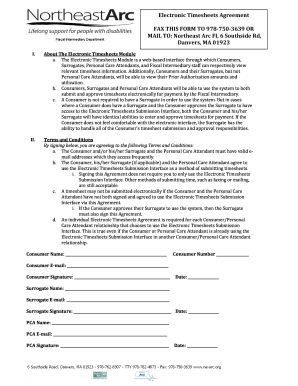
  • Northeast Arc Electronic Timesheets Agreement

Get Northeast Arc Electronic Timesheets Agreement

__ Surrogate Signature: ______________________________________________________ Date: _________________ PCA Name: _________________________________________________________________ PCA E mail: _______________________________________________________________ PCA Signature: ____________________________________________________________ Date: _________________ Acuerdo de uso de Hojas de Tiempo Electrónicas ENVIE POR FAX AL 978 750 3639 O POR CORREO: Northeast Arc FI, 6 Southside Rd, Danvers, MA 0192.

How it works

  1. Open form

    Open form follow the instructions

  2. Easily sign form

    Easily sign the form with your finger

  3. Share form

    Send filled & signed form or save

How to fill out the Northeast Arc Electronic Timesheets Agreement online

Filling out the Northeast Arc Electronic Timesheets Agreement online is a straightforward process designed to streamline your documentation. This guide will provide you with clear and step-by-step instructions to ensure your form is completed accurately and efficiently.

Follow the steps to complete the agreement online.

  1. Use the ‘Get Form’ button to access the Northeast Arc Electronic Timesheets Agreement and open it in your preferred editing tool.
  2. In the first section, enter the consumer name. Ensure that you provide the full name of the individual associated with the electronic timesheet.
  3. Next, input the consumer number in the designated field. This number is essential for identifying the consumer within the system.
  4. Fill in the consumer email address accurately to ensure proper communication regarding the timesheet.
  5. Move on to the consumer signature section. Ensure the consumer signs the form, indicating their agreement to the terms and conditions outlined.
  6. Enter the date on which the agreement is being signed. This date should reflect when the form is completed.
  7. For surrogate agreements, provide the surrogate's name and email address in the corresponding fields.
  8. In the surrogate signature section, obtain the signature of the surrogate to validate their acceptance of the terms.
  9. Input the date for the surrogate's signature as well.
  10. Proceed to the PCA name and email sections. Ensure that the PCA’s details are filled accurately.
  11. The PCA should then sign the form in the signature field to complete their agreement to the terms provided.
  12. Finally, enter the date when the PCA signs the document.
  13. Once all fields are filled out, review the document for accuracy. You can then save your changes, download, print, or share the completed form as necessary.

Ensure your documentation is complete and submit your electronic timesheets agreement online today.

Get form

Experience a faster way to fill out and sign forms on the web. Access the most extensive library of templates available.
Get form

Related content

DOC
The purpose of this Collective Bargaining Agreement is to promote quality jobs for...
Learn more
Employee Handbook
Non-exempt (Classified Staff) employees must complete weekly timesheets electronically on...
Learn more
and automation
The system was designed so Perry's 26 daily. Florida newpapers could use one computer cen...
Learn more

Related links form

Stephen Phillips Memorial Scholarship Fund Ferpa Release Form Stockton University Student Identification and Pin Request 2013 Stony Brook EHSF0024 2008 Stony Brook University NCE 316.6 2010

Questions & Answers

Get answers to your most pressing questions about US Legal Forms API.

Contact support

Filling your timesheet involves several steps for accuracy and compliance. Start by adding your identification details, such as name and position, before entering the dates and corresponding hours worked each day. Remember to comply with the Northeast Arc Electronic Timesheets Agreement guidelines during this process. Once completed, review it carefully before submitting for approval.

To fill out a time management sheet effectively, note down all the activities you plan to undertake during your work hours. Break down your day into time slots and allocate specific tasks accordingly. Align your logging process with the Northeast Arc Electronic Timesheets Agreement to optimize your time management. This structured approach helps you stay organized and productive.

Filling up a time card requires careful tracking of your work hours. Begin by entering your name and the week’s dates in the designated fields. Then, accurately input the hours worked each day, adhering to the Northeast Arc Electronic Timesheets Agreement. Double-check your entries for any mistakes before submitting to ensure your efforts are recognized.

To fill out a timesheet form, start by entering your basic information, like your name and department. Record the specific dates worked and the total hours for each day. Make sure to follow the instructions provided in the Northeast Arc Electronic Timesheets Agreement to avoid errors. Once completed, submit it to the appropriate person for validation and processing.

Filling out a time log involves noting the activities you engaged in throughout your working hours. Start by writing down the date, followed by the corresponding start and end times for each activity. Maintain consistency with the Northeast Arc Electronic Timesheets Agreement to track your hours effectively. This log will help both you and your employer understand how time is spent during work.

To fill out a time card, begin by entering your personal details, such as your name and employee ID if required. Next, record the dates and the hours you worked each day. Be sure to follow the Northeast Arc Electronic Timesheets Agreement guidelines to ensure accuracy and compliance. Finally, submit your completed time card for approval to your supervisor.

Submitting your Tempus timesheet requires you to log into the platform and access the timesheet section. Input your work hours and any additional required information in the appropriate fields. Once you verify the accuracy of your entries, submit your timesheet. Utilizing the Northeast Arc Electronic Timesheets Agreement can enhance your understanding of the submission process and improve accuracy.

To submit hours worked, access the timesheet tool provided by your organization. Enter the days and hours corresponding to your work schedule, ensuring all details are correct. Review your entries before finalizing your submission. By following the guidelines outlined in the Northeast Arc Electronic Timesheets Agreement, you can confidently complete this crucial task.

To add hours on Tevera, first log into your account and open the timesheet feature. Identify the specific entry for which you wish to add hours, and simply input the additional hours into the designated field. Verify that the total hours align with your records, and then save the changes. This aligns with the Northeast Arc Electronic Timesheets Agreement for accuracy and transparency.

Submitting a timesheet to Tevera is straightforward. Start by logging into your Tevera account and locating the timesheet submission section. Enter your hours worked, tasks undertaken, and any relevant notes. After reviewing the details, submit your information to ensure compliance with the Northeast Arc Electronic Timesheets Agreement.

Get This Form Now!

Use professional pre-built templates to fill in and sign documents online faster. Get access to thousands of forms.
Get form
If you believe that this page should be taken down, please follow our DMCA take down processhere.
Get Northeast Arc Electronic Timesheets Agreement
Get form
  • Adoption
  • Bankruptcy
  • Contractors
  • Divorce
  • Home Sales
  • Employment
  • Identity Theft
  • Incorporation
  • Landlord Tenant
  • Living Trust
  • Name Change
  • Personal Planning
  • Small Business
  • Wills & Estates
  • Packages A-Z
  • Affidavits
  • Bankruptcy
  • Bill of Sale
  • Corporate - LLC
  • Divorce
  • Employment
  • Identity Theft
  • Internet Technology
  • Landlord Tenant
  • Living Wills
  • Name Change
  • Power of Attorney
  • Real Estate
  • Small Estates
  • Wills
  • All Forms
  • Forms A-Z
  • Other Templates
  • Legal Hub
  • About Us
  • Help Portal
  • Legal Resources
  • Blog
  • Affiliates
  • Contact Us
  • Delete My Account
  • Site Map
  • Industries
  • Forms in Spanish
  • Localized Forms
  • State-specific Forms
  • Forms Kit
  • Real Estate Handbook
  • All Guides
  • Notarize
  • Incorporation services
  • For Consumers
  • For Small Business
  • For Attorneys
  • USLegal
  • FormsPass
  • pdfFiller
  • signNow
  • altaFlow
  • DocHub
  • Instapage
Form Packages
  • Adoption
  • Bankruptcy
  • Contractors
  • Divorce
  • Home Sales
  • Employment
  • Identity Theft
  • Incorporation
  • Landlord Tenant
  • Living Trust
  • Name Change
  • Personal Planning
  • Small Business
  • Wills & Estates
  • Packages A-Z
Form Categories
  • Affidavits
  • Bankruptcy
  • Bill of Sale
  • Corporate - LLC
  • Divorce
  • Employment
  • Identity Theft
  • Internet Technology
  • Landlord Tenant
  • Living Wills
  • Name Change
  • Power of Attorney
  • Real Estate
  • Small Estates
  • Wills
  • All Forms
  • Forms A-Z
  • Other Templates
Customer Service
  • Legal Hub
  • About Us
  • Help Portal
  • Legal Resources
  • Blog
  • Affiliates
  • Contact Us
  • Delete My Account
  • Site Map
  • Industries
  • Forms in Spanish
  • Localized Forms
  • State-specific Forms
  • Forms Kit
Legal Guides
  • Real Estate Handbook
  • All Guides
Prepared for you
  • Notarize
  • Incorporation services
Our Customers
  • For Consumers
  • For Small Business
  • For Attorneys
Our Sites
  • USLegal
  • FormsPass
  • pdfFiller
  • signNow
  • altaFlow
  • DocHub
  • Instapage
Social Media
Call us now toll free:
+1 833 426 79 33
As seen in:
© Copyright 1999-2026 airSlate Legal Forms, Inc. 17 Station Street, Suite 303, Brookline, MA 02445
  • Your Privacy Choices
  • Terms of Service
  • Privacy Notice
  • Content Takedown Policy
  • Bug Bounty Program