Loading
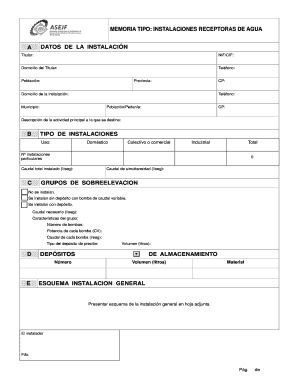
Get Memoria Tipo Instalaciones Receptoras De Agua A Datos De - Femeval
How it works
-

Open form follow the instructions
-

Easily sign the form with your finger
-

Send filled & signed form or save
How to fill out the MEMORIA TIPO INSTALACIONES RECEPTORAS DE AGUA A DATOS DE - Femeval online
Filling out the MEMORIA TIPO INSTALACIONES RECEPTORAS DE AGUA A DATOS DE - Femeval form online can seem daunting at first. This guide provides step-by-step instructions to help you complete the form accurately and efficiently, ensuring that all necessary information is included for proper processing.
Follow the steps to successfully complete the form.
- To begin, click the ‘Get Form’ button to access the MEMORIA TIPO INSTALACIONES RECEPTORAS DE AGUA A DATOS DE - Femeval form in your preferred online format.
- In the first section labeled 'DATOS DE LA INSTALACIÓN', fill in the details of the titular (holder) which include their NIF/CIF, address, phone number, population, province, postal code, and the address of the installation.
- Next, provide a description of the main activity that the installations will serve. Be concise but thorough.
- In the 'TIPO DE INSTALACIONES' section, specify the usage type: domestic, collective or commercial, or industrial, and enter the total number of installations. Additionally, indicate the total installed flow rate.
- Fill out the required 'GRUPOS DE SOBREELEVACION' information if applicable, noting whether installations are made without a tank, with variable flow pumps, or with tanks, and provide the necessary flow rate.
- In the 'DEPÓSITOS DE ALMACENAMIENTO' section, fill out the number and volume in liters for each storage tank along with the material used.
- For the 'CARACTERÍSTICAS DE LA INSTALACIÓN GENERAL', complete the table by indicating the number, denomination, diameter, length, and material for each part, including items like the main inlet, supply pipes, and meters.
- In the final section related to the installer and installation company, enter the installer’s details, including their NIF/NIE, company CIF, and sign the form as required.
- Once all fields are accurately completed, save your changes. You can then download, print, or share the completed form as needed.
Begin filling out your forms online today for a seamless experience.
Industry-leading security and compliance
US Legal Forms protects your data by complying with industry-specific security standards.
-
In businnes since 199725+ years providing professional legal documents.
-
Accredited businessGuarantees that a business meets BBB accreditation standards in the US and Canada.
-
Secured by BraintreeValidated Level 1 PCI DSS compliant payment gateway that accepts most major credit and debit card brands from across the globe.