Ary explanations. Sources of information Add further information on attached sheets as necessary. Note: Please take every reasonable step to see that the information on this form is as accurate and complete as practical. This will help maintain the integrity of Church family history files and reduce duplication of temple ordinance work. .

Open form follow the instructions

Easily sign the form with your finger

Send filled & signed form or save
How to fill out the Family Group Record online
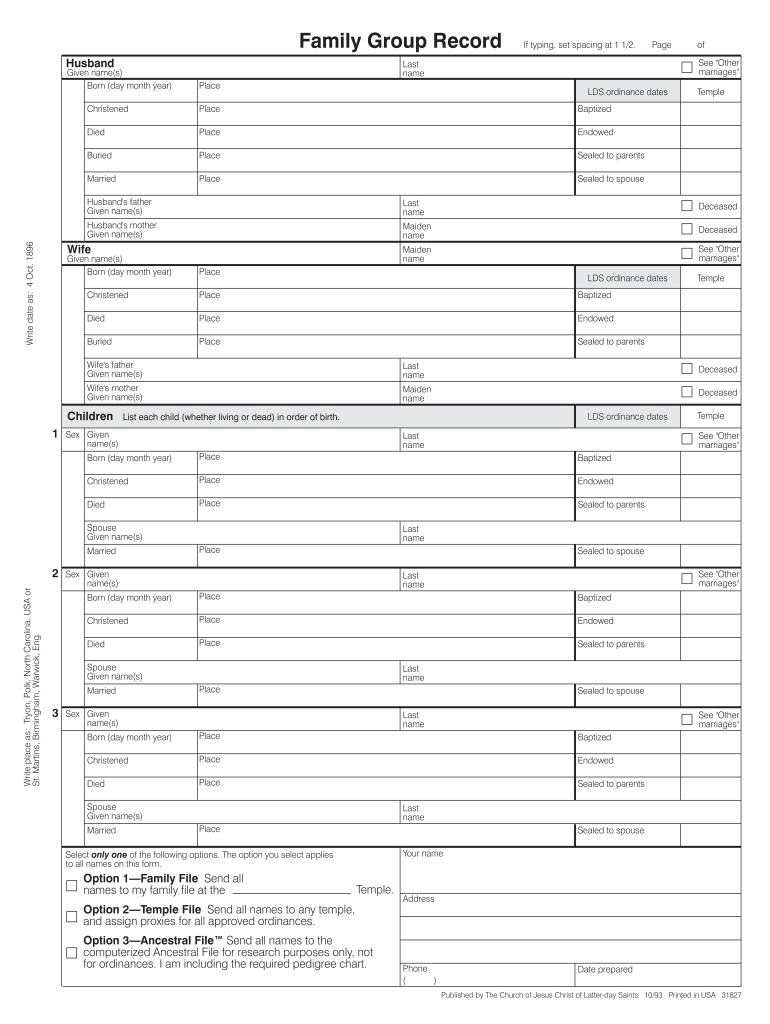
The Family Group Record is an essential document used in recording family information for genealogical purposes. This guide will provide you with clear and supportive instructions on how to accurately fill out the form online.
Follow the steps to complete the Family Group Record effectively.
- Click the 'Get Form' button to obtain the Family Group Record and access it in an online editor.
- Begin with the husband’s information. Enter the husband's full given name(s), last name, and date of birth in the appropriate fields. Ensure the date is entered as 'day month year' (e.g., 4 Oct. 1896).
- Complete the section for the husband's LDS ordinance dates by filling in details like Christened, Endowed, Buried, and Baptized, along with their corresponding places.
- Proceed to the wife’s details by entering her given names, maiden name, and date of birth in the designated fields. This should follow the same format as the husband’s section.
- Fill in the wife’s LDS ordinance dates similar to the husband's section, ensuring that the places are accurately captured.
- List each child in order of birth under the children’s section, providing details like sex, name, date of birth, and relevant LDS ordinance dates.
- Complete the section for other marriages by listing any additional marriages or sealings pertinent to the husband, wife, or children.
- In the sources of information section, add any necessary notes or attached sheets that clarify or provide further context to the information included.
- Finally, review all entries for accuracy and completeness, taking care to follow the instructions provided on maintaining the integrity of Church family history files.
- Once satisfied with the completed form, save your changes, and opt to download, print, or share the Family Group Record as needed.
Start filling out your Family Group Record online today and contribute to your family history!
Experience a faster way to fill out and sign forms on the web. Access the most extensive library of templates available.
Related content
Wife (maiden name). Occupation(s). Date. Place. Immigration. Born. Naturalization...
Family Group Sheet. Name and/or Date. Place. Husband: Born: Married: Died: Buried: Other...
This class will provide a more in-depth look at basic operations and working with...
Get answers to your most pressing questions about US Legal Forms API.
How to fill out a family group record?
To fill out a Family Group Record, begin by entering the names of the parents in the specified fields. Then, systematically add the children’s names and other relevant information, such as their dates of birth and marriages. By following this method, you create an accessible, organized representation of your family's history, making future research more manageable.
What is a family record?
A family record is a comprehensive collection of information about family members, often including names, birth dates, and family relationships. It can take various forms, from simple lists to detailed narratives. Understanding what a family record includes is crucial for anyone looking to document their family's heritage or fill out a Family Group Record effectively.
What is the definition of a family group record?
A Family Group Record is a structured document that outlines the relationships within a family, listing parents and their children along with relevant details. It serves as a valuable tool for genealogists and those interested in preserving family history. This record not only helps you maintain an organized view of your family tree but also serves as a reference for future research and documentation.
How do you write a family group?
Writing a family group involves depicting the relationships among family members clearly and engagingly. Begin with the head of the family, typically the parents, and then branch out to include children and other relatives. Using a Family Group Record format simplifies this process, as it visually organizes family ties and details concisely, ensuring nothing is overlooked.
How do you fill out a family background?
Filling out a family background requires a thoughtful approach to documenting your family’s history. Start with the basic information of each family member, such as names, birth dates, and significant life events. A Family Group Record can help structure this information, making it easier to capture and understand your family's heritage and connections.
How do I print a family group record?
Printing a Family Group Record is a straightforward process. Once you have completed the record on your computer, simply select the print option from your software or print the template provided by the US Legal Forms platform. Ensure your printer is set up correctly and check for a clear, legible output before proceeding to print multiple copies for family use.
How do I fill out a family group record?
To fill out a Family Group Record, begin by writing down the names of the parents in the designated sections. Next, list their children, making sure to include essential details like birth dates and places. A well-organized Family Group Record provides a clear view of your family's lineage and can serve as a foundation for deeper genealogical research.
How do I fill out family history?
Filling out your family history involves gathering information about your ancestors and their relationships. Start by collecting details such as names, dates of birth, and marriage information. You can utilize a Family Group Record to organize this data effectively, ensuring that each family member's information is easily accessible. This method also helps you visualize family connections over generations.
How do I print from family album?
To print from a family album, you need to select the images or pages you wish to print. After making your selections, check for a print option within the album's interface. This feature allows you to create a Family Group Record or photo collection that you can share with loved ones, preserving precious memories for future generations.
How can I print my whole family tree on FamilySearch?
Printing your entire family tree on FamilySearch is simple and user-friendly. Begin by opening your family tree and selecting the print option available on the platform. You can customize the print layout, ensuring your Family Group Record reflects your family's history accurately and comprehensively.
Use professional pre-built templates to fill in and sign documents online faster. Get access to thousands of forms.
If you believe that this page should be taken down, please follow our DMCA take down process here.