Loading
Get Id 140
How it works
-

Open form follow the instructions
-

Easily sign the form with your finger
-

Send filled & signed form or save
How to fill out the Id 140 online
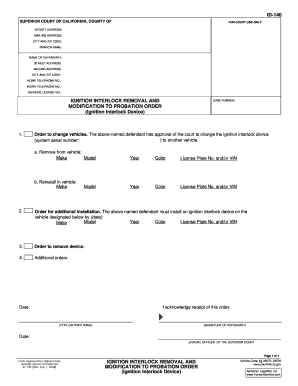
Filling out the Id 140 form online is an essential step for individuals required to modify or remove an ignition interlock device as part of a legal order. This guide will provide you with step-by-step instructions to ensure that you complete the form accurately and efficiently.
Follow the steps to successfully complete the Id 140 form online.
- Click the ‘Get Form’ button to access the Id 140 form and open it in your browser. This will allow you to start filling out the form directly online.
- Begin by entering the name of the defendant in the designated field. Make sure to provide the full name as it appears on legal documents.
- Input the street address, mailing address, city, and ZIP code in the respective fields to ensure accurate identification and communication.
- Fill in the work telephone number and home telephone number in their respective sections. This contact information is important for court communications.
- Provide the driver's license number of the defendant. This information is required for verification purposes.
- Enter the case number associated with the legal order. This ensures that the form is processed regarding the correct case.
- In the section for the ignition interlock device, indicate whether the device should be removed from the vehicle and specify the vehicle's make, model, year, and color.
- If requesting a modification or change to another vehicle, provide the same details for the new vehicle where the ignition interlock device will be reinstalled.
- Review all sections for accuracy. Once verified, sign and date the form in the designated areas to authenticate it.
- After completing the form, you can save your changes, download a copy for your records, print it out, or share the form as required.
Take action now to complete your documents online and ensure compliance with court orders.
This event is logged when the time service has stopped advertising as a time source because the local machine is not an Active Directory Domain Controller. To resolve this issue: Ensure that the computer reporting Event ID 140 is a domain controller.