Loading
Get Ca Sos/np-30 2012-2026
How it works
-

Open form follow the instructions
-

Easily sign the form with your finger
-

Send filled & signed form or save
How to fill out the CA SOS/NP-30 online
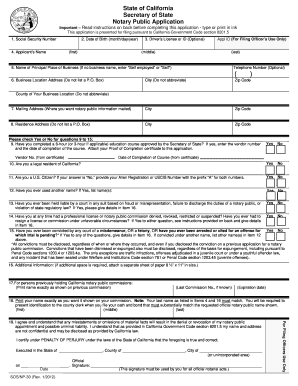
This guide provides clear and comprehensive instructions on filling out the CA SOS/NP-30 form online. Follow the steps outlined below to ensure your application is completed accurately and efficiently.
Follow the steps to complete the CA SOS/NP-30 online application.
- Click the ‘Get Form’ button to obtain the CA SOS/NP-30 application in an editable format.
- Enter your social security number in the designated field as this is required by California Family Code section 17520(d).
- Input your date of birth in the format of month, day, and year.
- If applicable, provide your driver’s license number or your California identification number. Completing this field is optional.
- Type your full name, including your first name, middle name, last name, and any suffix (such as Sr., Jr., III). If you don’t have a middle name, enter 'NMN.' If you have initials, include 'Initial Only' after each initial.
- If applicable, enter the name of your business. If you are self-employed, enter 'Self employed' or 'Self.' Include an optional telephone number for your principal place of business.
- Provide the street address of your principal place of business. This address must not include a P.O. Box and should state the city and zip code in full.
- Specify the county of your business location, ensuring the name is spelled out fully, with no abbreviations.
- If you wish to receive notary public information at an address different from your business, enter that mailing address. A P.O. Box is acceptable here.
- Complete your residence address, again ensuring no P.O. Box number is used.
- Have your vendor number and the completion date of your notary public education course ready, as these details must be provided. Don't forget to attach your Proof of Completion certificate.
- Confirm your legal residency in California by checking the appropriate box.
- Indicate your citizenship status. If you are not a U.S. citizen, provide your Alien Registration or USCIS Number with the prefix 'A'.
- Disclose any other name(s) previously used. This includes maiden names or names used prior to U.S. citizenship.
- Respond to questions regarding any court records of fraud, prior licenses, or criminal charges that may affect your application. Provide relevant details in Item 16.
- If currently holding or previously held a notary public commission, input that information accurately as required.
- Type your name exactly as you wish it to appear on your commission, ensuring that this name matches your earlier entries.
- Finalizing your application, sign under penalty of perjury by entering the state, county, city, and date where you are submitting the form.
- Review all entries for accuracy before saving your changes. You can then download, print, or share your completed CA SOS/NP-30 form.
Start your application today by completing the CA SOS/NP-30 form online!
Getting a notarized consent letter involves drafting the letter and having it signed in front of a notary public. Ensure you include the necessary details and provide valid identification at the time of notarization. If you encounter challenges creating or understanding legal documents, uslegalforms can assist with information related to CA SOS/NP-30, making the process smoother for you.