Loading
Get Folwell School
How it works
-

Open form follow the instructions
-

Easily sign the form with your finger
-

Send filled & signed form or save
How to fill out the Folwell School online
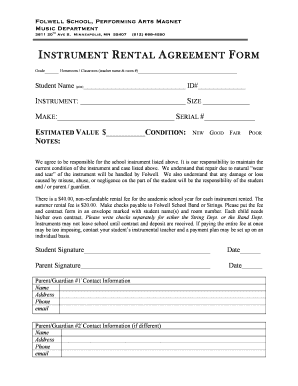
The Folwell School instrument rental agreement form is designed to facilitate the rental of school instruments for students. This guide provides clear, step-by-step instructions to help you complete the form online with ease.
Follow the steps to fill out the Folwell School instrument rental agreement form.
- Press the ‘Get Form’ button to obtain the instrument rental agreement form and open it for editing.
- Identify the grade and homeroom/classroom information by providing your child's teacher's name and room number in the designated fields.
- Clearly print the student’s name and ID number in the specified areas of the form.
- Select the instrument being rented by entering the instrument name, size, make, and serial number in the corresponding fields.
- Estimate the value of the instrument and indicate its condition by choosing from the options: new, good, fair, or poor.
- Read and understand the agreement to maintain the condition of the instrument and the responsibilities regarding potential damage or loss.
- Input both the student and parent/guardian signatures, along with the dates, to finalize the agreement.
- Complete the parent/guardian contact information section, including name, address, phone number, and email. If applicable, fill out the information for a second parent/guardian.
- Double-check all entries for accuracy and completeness before saving your changes.
- Once finished, save your changes, and prepare to download, print, or share the form as needed.
Complete your Folwell School instrument rental agreement form online today.