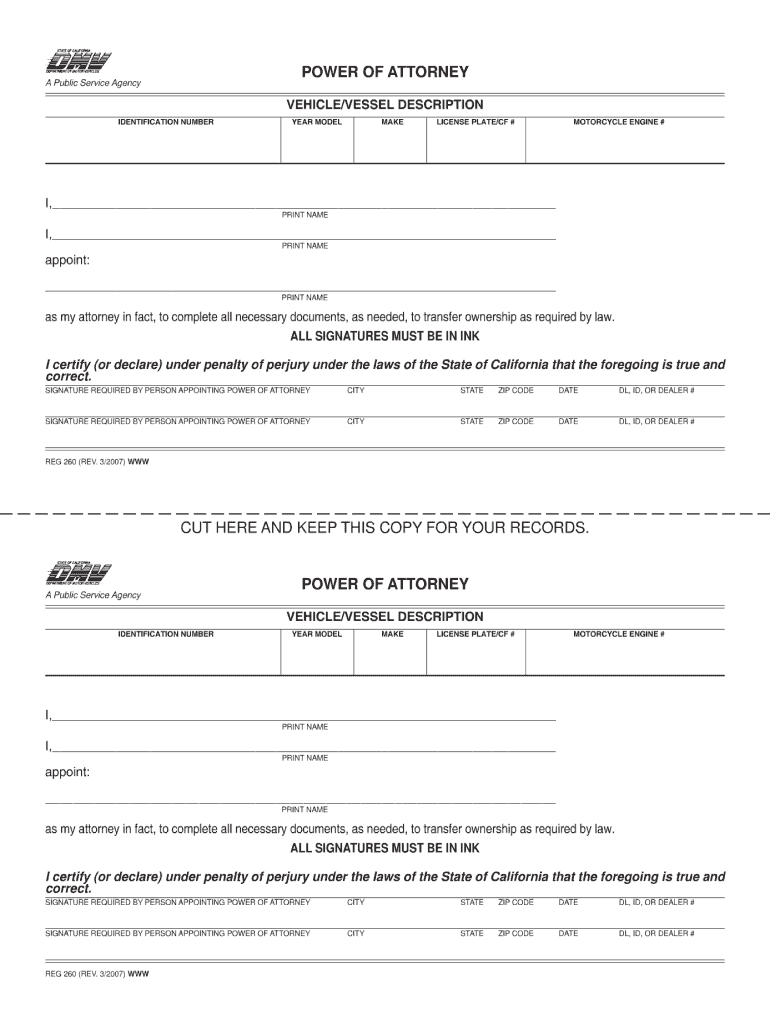
R RECORDS. POWER OF ATTORNEY A Public Service Agency VEHICLE/VESSEL DESCRIPTION IDENTIFICATION NUMBER YEAR MODEL MAKE LICENSE PLATE/CF # MOTORCYCLE ENGINE # I,________________________________________________________________________ PRINT NAME I,________________________________________________________________________ PRINT NAME appoint: _________________________________________________________________________ PRINT NAME as my attorney in fact, to complete all necessary documents, as ne.
Loading

Open form follow the instructions

Easily sign the form with your finger

Send filled & signed form or save
How to fill out the CA REG 260 online
Filling out the CA REG 260 form is an essential step in transferring vehicle or vessel ownership in California. This guide provides clear instructions to assist you in completing the form accurately and efficiently online.
Follow the steps to complete the CA REG 260 form online.
- Click ‘Get Form’ button to access the CA REG 260 form and open it in your preferred online editor.
- Provide the vehicle or vessel description details. Fill in the identification number, year, model, make, license plate or CF number, and motorcycle engine number as applicable.
- In the designated field, print your name clearly to specify the person granting power of attorney.
- In the next field, print the name of the person you are appointing as your attorney in fact, who will complete the necessary documents for ownership transfer.
- Ensure all signatures are in ink. Sign the form where indicated to certify under penalty of perjury that the information provided is correct.
- Fill in your city, state, zip code, and the date of signing in the specified fields.
- If applicable, include your driver license, state identification, or dealer number.
- Complete any additional required sections as needed and review the entire form for accuracy.
- Once all fields are filled out and verified, proceed to save your changes, download the form, print it, or share it as needed.
Complete your CA REG 260 form online today to streamline your vehicle or vessel ownership transfer.
Experience a faster way to fill out and sign forms on the web. Access the most extensive library of templates available.
Related content
Note A photocopy or fax copy of a general POA, including the REG 260 is acceptable...
Includes interviewing, conference participation, leadership decisions, conflict...
REG 260 is a legal template intended to allot powers to appointed agent to complete...
Get answers to your most pressing questions about US Legal Forms API.
How to fill out DMV statement of facts form?
To fill out the DMV statement of facts form, start by identifying the purpose of the statement and the relevant vehicle details. Provide clear and precise facts to support your statement, avoiding any ambiguous language. Completing this form accurately is crucial, especially when related to CA REG 260. uslegalforms can assist in drafting and ensuring that your submission is correct.
How to fill out a vehicle title application?
Filling out a vehicle title application involves providing personal information and details about the motor vehicle. Include the Vehicle Identification Number (VIN) and any other information specific to your car. Verify that all information is accurate before submitting the application to the DMV. Consider uslegalforms for templates that can save you time and ensure compliance.
How to fill out a 262 form?
To fill out a 262 form, enter the vehicle information and the seller's details accurately. Next, provide the odometer reading and declare whether it is accurate. Make sure to sign and date the form where indicated. Utilizing uslegalforms can streamline this process, especially when paired with the CA REG 260.
Do I need form reg 262 to sell my car?
You do not necessarily need form CA REG 262 to sell your car. However, this form can help declare the odometer reading as part of the transaction. Always check with your local DMV for any additional paperwork that might assist in a smooth sale. Using uslegalforms can help ensure you have all the necessary documents prepared.
How to fill out a motor vehicle power of attorney form?
To complete a motor vehicle power of attorney form, start by providing details about the vehicle and the parties involved. Clearly define the powers you grant and specify the duration of this authorization. Ensure that all signatures are present, as this validates the form. Consider using uslegalforms to simplify the process of drafting and filling out these documents, including CA REG 260.
How to fill out Affidavit of Inheritance of a motor vehicle?
Filling out the Affidavit of Inheritance for a motor vehicle typically involves providing details about the deceased owner and the inheritor. You will need to gather supporting documents, such as a death certificate and proof of your identity. Once the information is complete, submit it alongside any other required documents to the DMV. The CA REG 260 may also be necessary to complete the transfer.
Does reg 260 need to be notarized?
The CA REG 260 form does not require notarization. However, it’s always good practice to check with your local DMV office for any specific requirements. Having documentation notarized can add an extra layer of authenticity, but it isn't a mandatory step for the CA REG 260. Be sure you keep copies of your forms for your records.
What is reg 260?
CA REG 260 refers to a specific form used for vehicle registration in California. This form helps document the ownership and legal status of a vehicle, ensuring all information aligns with state regulations. It is vital for vehicle owners to understand CA REG 260, as it impacts their legal rights and obligations. To simplify the registration process, consider using USLegalForms for easy access to essential forms and guidance.
How long can you drive a vehicle in California with out of state plates?
You can typically drive a vehicle with out of state plates in California for a maximum of 20 days without registering it in California. However, once you establish residency or if your stay exceeds 20 days, you must register your vehicle in accordance with CA REG 260. Failing to comply may lead to fines and legal issues. Consulting USLegalForms can help you navigate the registration and compliance process smoothly.
What is Section 260 of the California Vehicle Code?
Section 260 of the California Vehicle Code pertains to the documentation needed for vehicle registration and ownership. This part of the code emphasizes the need for accurate information to prevent fraud and ensure public safety. By adhering to CA REG 260, vehicle owners can avoid penalties and complications. For a deeper understanding, explore resources on USLegalForms to simplify the registration process.
Use professional pre-built templates to fill in and sign documents online faster. Get access to thousands of forms.
If you believe that this page should be taken down, please follow our DMCA take down process here.