Loading
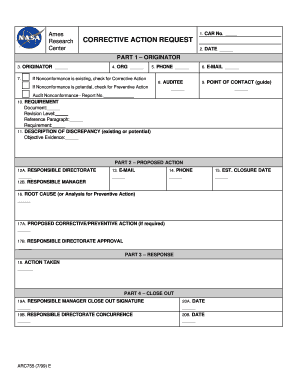
Get Car No Research Corrective Action Request Center Date Part
How it works
-

Open form follow the instructions
-

Easily sign the form with your finger
-

Send filled & signed form or save
How to fill out the CAR No Research CORRECTIVE ACTION REQUEST Center DATE PART online
This guide provides you with step-by-step instructions to successfully complete the CAR No Research CORRECTIVE ACTION REQUEST form online. By following these instructions, you will ensure that all necessary information is accurately reported.
Follow the steps to complete the form efficiently.
- Click ‘Get Form’ button to obtain the form and open it in your editor.
- Enter the CAR No. in the designated field. This is a unique identifier for your corrective action request.
- Input the DATE in the specified area to document when the request is being filed.
- In Part 1 – ORIGINATOR, fill in your name as the originator of the corrective action request.
- Provide your ORGANIZATIONAL unit in the next field.
- If there is an existing nonconformance, make sure to check the box for Corrective Action.
- Enter your PHONE number for direct contact regarding the request.
- List your E-MAIL address to facilitate communication.
- Indicate the AUDITEE concerned in this matter.
- Identify the POINT OF CONTACT by providing their name and relevant details.
- Record the Audit Nonconformance - Report No. if applicable.
- Fill out the REQUIREMENT section by specifying the Document, Revision Level, Reference Paragraph, and Requirement.
- Describe the DISCREPANCY in detail, explaining whether it is existing or potential, alongside Objective Evidence.
- In Part 2 – PROPOSED ACTION, designate the RESPONSIBLE DIRECTORATE for addressing the corrective action.
- Provide the E-MAIL address for the responsible directorate.
- Name the RESPONSIBLE MANAGER who will oversee the corrective action.
- Fill in the PHONE and ESTIMATED CLOSURE DATE for the proposed action.
- If necessary, articulate the PROPOSED CORRECTIVE/PREVENTIVE ACTION.
- Obtain the RESPONSIBLE DIRECTORATE APPROVAL for the proposed actions detailed.
- In Part 3 – RESPONSE, document the ACTION TAKEN in response to the original discrepancy.
- In Part 4 – CLOSE OUT, secure the RESPONSIBLE MANAGER CLOSE OUT SIGNATURE and date it.
- Also capture the RESPONSIBLE DIRECTORATE CONCURRENCE and date it.
- In Part 5 – VERIFICATION, indicate whether ACTION TAKEN was EFFECTIVE by selecting 'Yes' or 'No.'
- Provide a reason for effectiveness or ineffectiveness.
- If necessary, assign a NEW CAR No. and document the DATE.
- Finally, save your changes, download, print, or share the completed form as required.
Complete your CAR No Research CORRECTIVE ACTION REQUEST form online today for efficient document management.
Commerce Acquisition Regulations Part NumberTitlePart 1317PART 1317 - SPECIAL CONTRACTING METHODSPart 1318PART 1318 - EMERGENCY ACQUISITIONSPart 1319PART 1319 - SMALL BUSINESS PROGRAMSPart 1322PART 1322 - APPLICATION OF LABOR LAWS TO GOVERNMENT ACQUISITIONS45 more rows
Industry-leading security and compliance
US Legal Forms protects your data by complying with industry-specific security standards.
-
In businnes since 199725+ years providing professional legal documents.
-
Accredited businessGuarantees that a business meets BBB accreditation standards in the US and Canada.
-
Secured by BraintreeValidated Level 1 PCI DSS compliant payment gateway that accepts most major credit and debit card brands from across the globe.