Loading
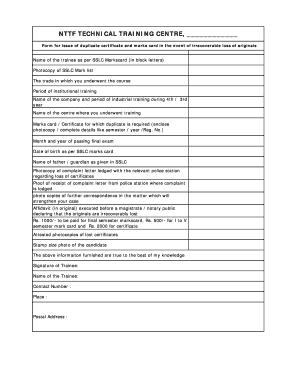
Get Nttf Technical Training Centre,
How it works
-

Open form follow the instructions
-

Easily sign the form with your finger
-

Send filled & signed form or save
How to fill out the NTTF TECHNICAL TRAINING CENTRE online
Filling out the NTTF Technical Training Centre form for the issue of a duplicate certificate and marks card can seem daunting. This guide provides clear, step-by-step instructions to help you through the process smoothly.
Follow the steps to successfully complete the form online.
- Click ‘Get Form’ button to obtain the form and open it in the editor.
- Fill in the name of the trainee as it appears on the SSLC Markscard using block letters.
- Upload a photocopy of the SSLC Mark list.
- Indicate the trade in which you underwent training during the course.
- Specify the period of your institutional training.
- Provide the name of the company where you completed your industrial training, along with the corresponding period during your 3rd or 4th year.
- Input the name of the centre where your training took place.
- Detail the marks card or certificate for which a duplicate is needed, including a photocopy if available or provide complete details such as semester, year, and registration number.
- Fill in the month and year of passing the final exam.
- Enter the date of birth as per your SSLC marks card.
- Input the name of your father or guardian as stated in the SSLC.
- Upload a photocopy of the complaint letter that was lodged with the relevant police station regarding the loss of certificates.
- Provide proof of receipt of the complaint letter from the police station where the complaint was lodged.
- Include photocopies of any further correspondence related to this matter that will support your case.
- Attach an original affidavit executed before a magistrate or notary public, declaring that the originals are irrecoverably lost.
- Specify the payment amount: Rs. 1000 for the final semester marks card, Rs. 500 for I to V semester marks cards, and Rs. 2000 for the certificate.
- Upload attested photocopies of the lost certificates.
- Add a stamp-sized photo of the candidate.
- Confirm that the information provided is true to the best of your knowledge.
- Sign the form, and fill in your name, contact number, place, and postal address.
- After completing all sections, review your entries for accuracy, then save your changes, download, print, or share the completed form as needed.
Complete your NTTF Technical Training Centre documents online today for a smooth application process.
Tag: Nigeria Table Tennis Federation (NTTF)
Industry-leading security and compliance
US Legal Forms protects your data by complying with industry-specific security standards.
-
In businnes since 199725+ years providing professional legal documents.
-
Accredited businessGuarantees that a business meets BBB accreditation standards in the US and Canada.
-
Secured by BraintreeValidated Level 1 PCI DSS compliant payment gateway that accepts most major credit and debit card brands from across the globe.