Loading
Get Formulaire 2777-d
How it works
-

Open form follow the instructions
-

Easily sign the form with your finger
-

Send filled & signed form or save
How to fill out the Formulaire 2777-d online
Filling out the Formulaire 2777-d online is a straightforward process that enables users to declare capital income and associated taxes easily. This guide provides step-by-step instructions to ensure accurate completion of the form.
Follow the steps to complete your Formulaire 2777-d online.
- Click the ‘Get Form’ button to obtain the form and open it in your preferred online editing tool.
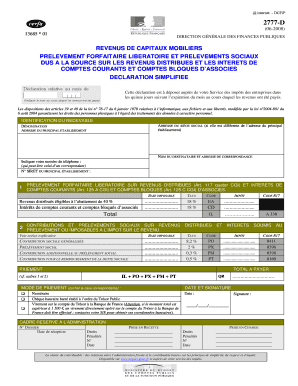
- In the 'Identification du redevable' section, enter the name of the liable person and address of the main establishment, if different from the registered office address.
- Provide contact information, including a phone number, which may be that of a representative, and the SIRET number of the main establishment.
- Move to the section for 'Revenus distribués éligibles à l’abattement de 40 %', where you will input the taxable base and applicable rates for distributed revenues and interest from current accounts.
- Complete the contributions and social levies section by entering the taxable base, rates, and codes for contributions such as social contribution and additional levy.
- Calculate the total amount due by summing all entries from the previous sections, ensuring accuracy before proceeding.
- Select the method of payment by checking the appropriate box and providing the necessary details, including the date and signature.
- Review all the information entered for correctness. Once confirmed, save your changes, download or print your completed form for your records.
Start filling out your Formulaire 2777-d online today to ensure timely and accurate submission.