Loading
Get Formato Para Envio De Equipos A Laboratorio De Soporte De Syscom ...
How it works
-

Open form follow the instructions
-

Easily sign the form with your finger
-

Send filled & signed form or save
How to fill out the Formato Para Envio De Equipos A Laboratorio De Soporte De Syscom online
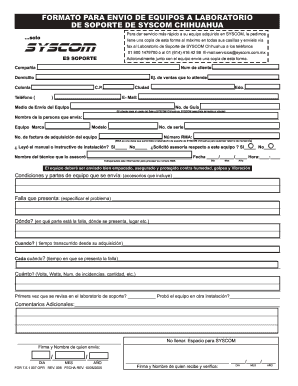
Filling out the Formato Para Envio De Equipos A Laboratorio De Soporte De Syscom is an essential step to ensure your equipment receives timely support. This guide provides a clear and structured approach to completing the form online, making the process as smooth as possible.
Follow the steps to effectively complete the form.
- Click ‘Get Form’ button to obtain the form and open it in the editor.
- In the first section, fill in the company name and customer number accurately. Ensure correct spelling and include all required information.
- Provide the complete address including street, neighborhood, postal code, city, and state. Make sure the contact information is up-to-date.
- Enter the telephone number and email for correspondence. These should be connected to the equipment being sent for support.
- Specify the shipping method for the equipment along with the tracking number. Note that the client is responsible for shipping costs.
- Complete the details for the person sending the equipment, including their name and contact information.
- Fill in details about the equipment such as brand, model, serial number, and the invoice number of the acquired equipment.
- Input the RMA number given by the support laboratory, crucial for processing the return.
- Indicate if you have read the installation manual and if you sought assistance regarding the equipment. Include the name of the technician who assisted you.
- Detail the condition of the equipment and any accessories included in the package.
- Clearly describe the issue you are experiencing with the equipment, including where it occurs and any relevant timing information.
- Answer additional questions related to the frequency and severity of the issues, specifying any metrics such as volts or watts.
- Provide any additional comments that might assist in diagnosing the issue.
- Finally, ensure to sign and date the form before submission.
- Once the form is filled out, save changes, download, or print it for your records, and prepare it for submission.
Complete your documents online today to receive efficient support for your equipment.