Loading
Get Neil Levitsky
How it works
-

Open form follow the instructions
-

Easily sign the form with your finger
-

Send filled & signed form or save
How to fill out the Neil Levitsky referral form online
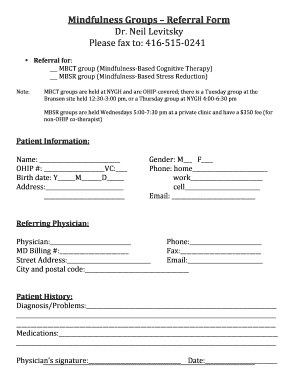
Filling out the Neil Levitsky referral form online is a straightforward process designed to facilitate your access to mindfulness groups. This guide provides clear, step-by-step instructions to help you complete the form effectively.
Follow the steps to easily complete the form online.
- Press the ‘Get Form’ button to obtain the referral form and open it in the online editor.
- Select the group you are referring to by checking the appropriate box for either the MBCT (Mindfulness-Based Cognitive Therapy) group or the MBSR (Mindfulness-Based Stress Reduction) group.
- Fill in the patient information section, providing the required details, including name, OHIP number, phone numbers (home, work, and cell), birth date, address, and email.
- Complete the referring physician section by entering the physician's name, phone number, billing number, fax number, street address, email, city, and postal code.
- In the patient history section, provide information regarding the patient's diagnosis or problems, as well as any current medications.
- The referring physician must sign and date the form. Ensure to fill this section accurately.
- After filling out all sections, review the form for accuracy and completeness. Save your changes, and then you may download, print, or share the completed document as needed.
Complete your referral form online to ensure timely processing.
Industry-leading security and compliance
US Legal Forms protects your data by complying with industry-specific security standards.
-
In businnes since 199725+ years providing professional legal documents.
-
Accredited businessGuarantees that a business meets BBB accreditation standards in the US and Canada.
-
Secured by BraintreeValidated Level 1 PCI DSS compliant payment gateway that accepts most major credit and debit card brands from across the globe.