Loading
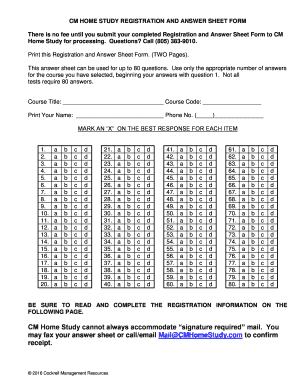
Get Cm Home Study Cannot Always Accommodate Signature
How it works
-

Open form follow the instructions
-

Easily sign the form with your finger
-

Send filled & signed form or save
How to fill out the CM Home Study Cannot Always Accommodate Signature online
Filling out the CM Home Study cannot always accommodate signature form can seem daunting, but this guide will provide you with clear and concise instructions to complete the process online. Each section will be broken down to ensure you have all the necessary information at your fingertips.
Follow the steps to confidently complete the form online.
- Press the ‘Get Form’ button to access the form and open it in your preferred online document editor.
- Begin by completing the course title and course code fields on the form. These will help identify the specific course for which you are registering.
- Enter your name clearly in the designated area. It is important that the name matches your identification for accurate record keeping.
- Provide your phone number in the appropriate field to ensure you can be contacted if necessary.
- Proceed to mark your answers on the answer sheet. For each question, select the best response by marking an 'X' in the correct box corresponding to your choice.
- After completing the answers, make sure to review your responses to ensure accuracy. You may be using up to 80 questions depending on the course selected.
- On the next page, fill out the registration information including verification of completion requests, your credentials, and contact information.
- Certify your independence in answering the questions by signing the designated area on the form.
- Choose your payment method. Fill in details for credit card payments, including the number and expiration date, or indicate if you are paying by check or money order.
- Finally, before submission, review all sections carefully for completeness. Once assured everything is accurate, save your changes, and download or print the form. Submit the form via fax or email as instructed.
Complete your registration and answer sheet online today to ensure a smooth and efficient processing experience.
A typical type III Quarter would consist of one living room,one kitchen and one bedroom with attached bathroom and toilet.
Industry-leading security and compliance
US Legal Forms protects your data by complying with industry-specific security standards.
-
In businnes since 199725+ years providing professional legal documents.
-
Accredited businessGuarantees that a business meets BBB accreditation standards in the US and Canada.
-
Secured by BraintreeValidated Level 1 PCI DSS compliant payment gateway that accepts most major credit and debit card brands from across the globe.